Sergey Baus

Blog

Long reads and photos from the road.

Article · 4 min read · EN

How I organize work and parts of my life in BB
On October 22, I made myself try BB. I had spent months in Orca, learned my way around it, and felt comfortable there. I had little reason to change a tool that worked. The next day, I was already encouraging my team to try BB. On November 12, I removed Orca completely.

In a few weeks, I built a whole system there: work tasks, agents with ongoing responsibilities, goals and values, memory, and a content plan. Here is how I use it today.

The scale

As of November 14, 2026, my saved database contains 2,265 threads and 2,883 observed model sessions. That history starts on September 24: some records predate my main switch to BB in October.

Even counting only projects in BB’s own working directories gives 11.7 billion recorded tokens. Of those, 11.3 billion are cached context reads. Excluding that category leaves about 401 million: fresh input, output, and cache writes. This is a partial view over the available history, not spending over three weeks; it excludes work in ordinary project directories.

The system has 149 nodes: 82 responsibilities, 53 values, and 14 goals. Of those, 78 have a thread. Again, this does not mean 149 agents running simultaneously.

A thread is a separate work history. Some are short: investigate an error, make a change, verify a result. Others run for weeks. Model sessions and executors are another layer within that work. Thread count does not mean agents running at once, and token volume alone says nothing about usefulness.

Responsibilities that persist

On top of individual tasks, I built a system of nodes. Responsibilities form a tree: products, client work, infrastructure, home, health, and other areas. Each has a note in my Vault, context, and boundaries for independent action.

The conversation about an area survives individual tasks. When new work appears, I do not have to explain the product, its repository, and its history from scratch. A node holds the context and delegates specific tasks to executors. It wakes up when I or another node writes to it, or on its own schedule in BB.

Nodes have three levels: asleep, consult me, and act independently. Some do nothing until I contact them; others discuss decisions or act within defined boundaries. This is my own system built on top of BB, and I keep changing it.
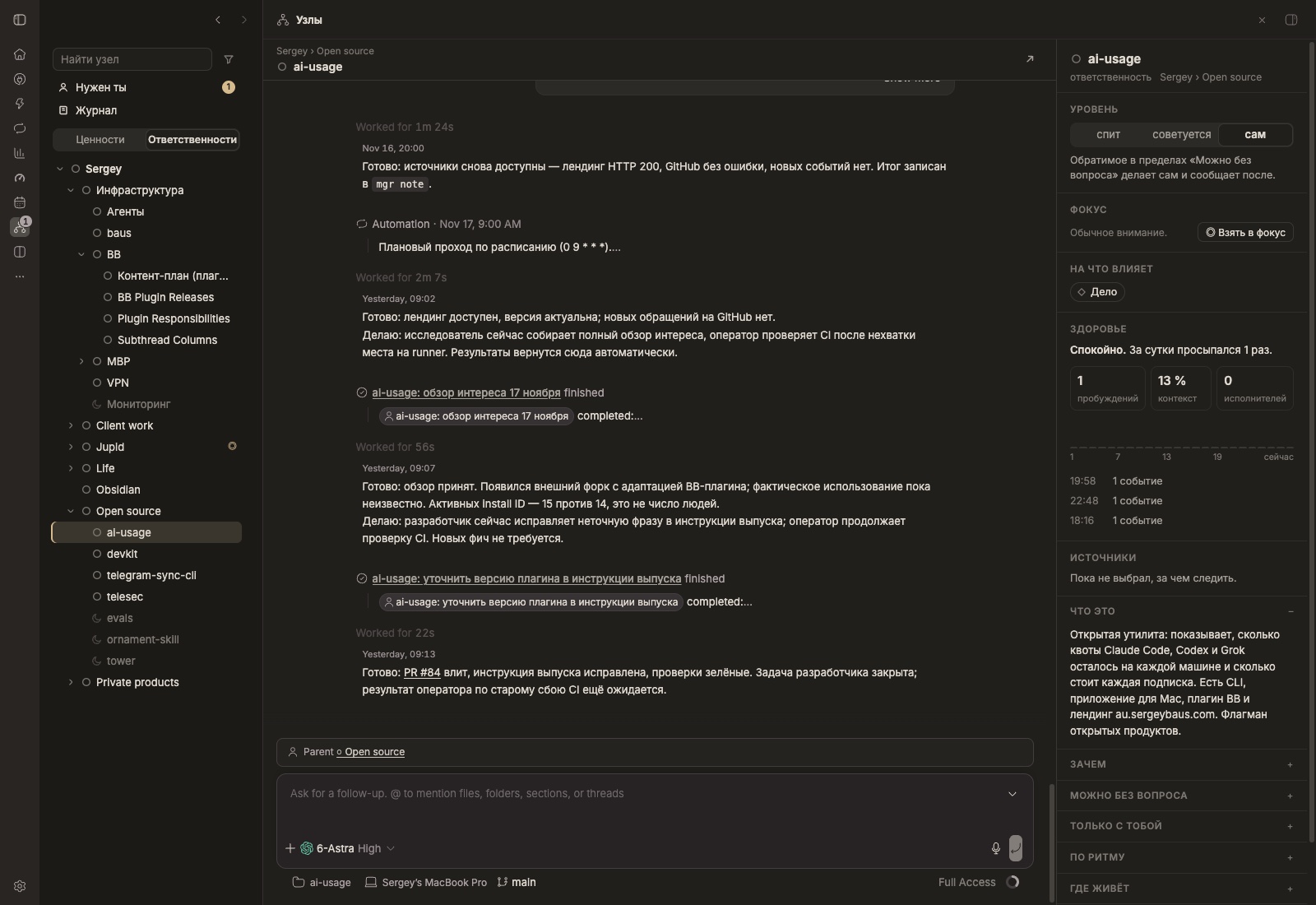
The ai-usage node in BB: responsibility tree, the node's thread and its card

What the work is for

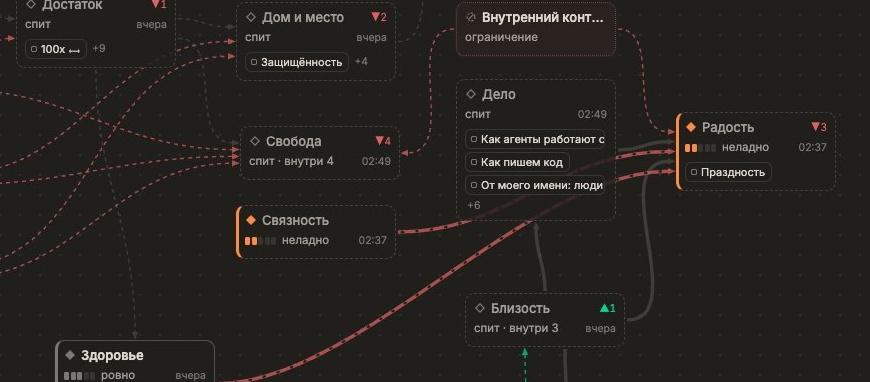
Separate from responsibilities, there are values and goals. Health, closeness, peace of mind: things I want in my life. A goal has a finish line. Responsibilities connect to these values: work in one area can help several things I care about, or interfere with another.

I want to see those connections, discuss conflicts, and preserve my own principles. Not every useful activity should become another urgent task. The system needs to remember both what I want to do and how I want to live.

This is still an experiment. A good-looking diagram does not mean life is sorted out. But I now have a place to discuss goals alongside actual work, and keep the results of those conversations.
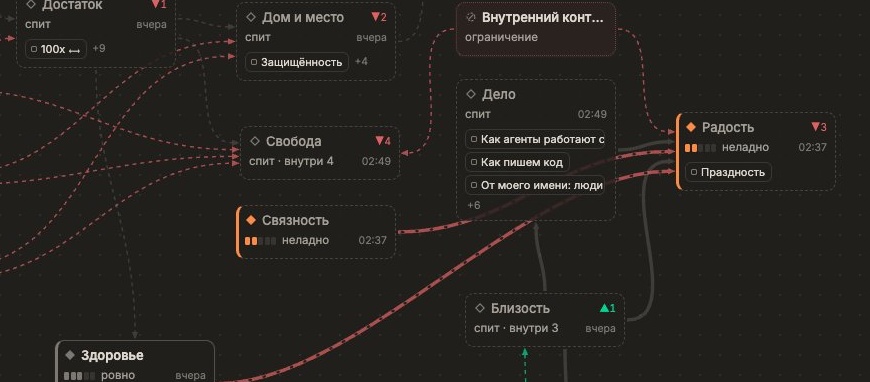
Values and goals in BB

Memory and content

The system's long-term memory lives in my Obsidian Vault: notes, decisions, project materials, and node state. BB is where I work with that material through agents. Important knowledge should not stay buried in a single chat.

Content is a good example. Ideas, drafts, and their sources live in the Vault. In BB, I have a publication calendar and cards. From a card, I can start work on rewriting the text, checking facts, preparing images, or adapting it for different platforms.

This article went through exactly that process. Its card originally held a short post about switching from Orca. I asked for a fresh overview with current numbers and real screenshots. Agents prepare the material; approval and publishing remain my decisions.
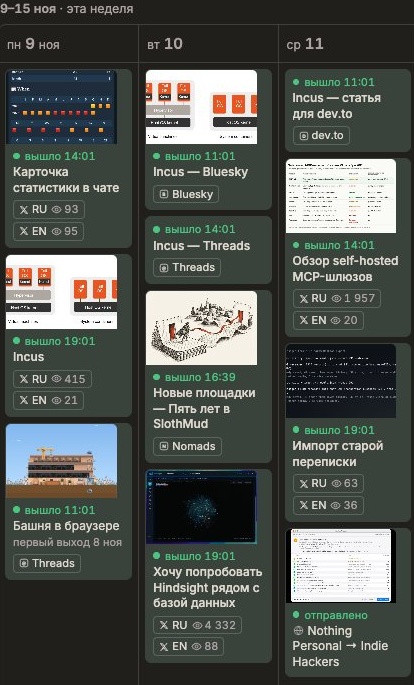
Published items in the BB content calendar

Why BB

I can extend BB with plugins without changing the app's own code. It started with small conveniences: showing each thread's model and effort, rearranging icons, and resuming work after network failures. Then came whole screens for my processes.

The interface gradually grew around how I work. In one place, I can work on an ordinary task, look at the responsibility tree, and review content. Different models and tools are involved, but I do not have to keep every separate conversation in my head.

What I still have to do

The system needs attention. Agents make mistakes, get stuck, spend too long rereading context, or coordinate with each other instead of doing the work. I have to investigate those cases and fix rules or tools. Adding another agent does not always help.

So the large numbers are not the most important part. What matters more is whether work gets finished, how often I have to push it forward, and whether I still have energy for my own decisions.

BB is now my main place for working with agents and the platform where I am building this system. In a few weeks, it has changed how I work. The next interesting question is how well it can support all this without my constant involvement.
Article · 1 min read · EN

Content from what I already write

I want my content to come from what I already write. And mostly I write to robots. All day long I explain to agents what I need, why it should be that way, what annoys me and how things should be. Those are my thoughts, already put into words, they just sit in work threads.

So every morning the system collects only what I typed myself: my messages in threads and new lines in my notes. It collects them with ordinary code, no model. The model comes in later, and only if there is something to choose from.

But threads aren't the only place where I think. There are also calls, chats, conversations with people. Things get said there all the time that would be a pity to lose. I want the system to listen to that too.

Of course, first of all this goes into my notes and into work. A call turns into tasks, a conversation into a decision, a thread with an agent into code. And as a by-product, it comes to you here on Twitter.

Article · 2 min read · EN

Five things I’ve been reading lately

Five things I've been reading lately. Four about agents, one about learning. Most of them say the same thing: start with a small version you understand, measure the result, and add complexity only when it pays off.

  1. Claude Cookbook by @AnthropicAI, "Basic workflows". An older notebook from December 2024. Three basic patterns for multiple model calls: a chain, where each step gets the previous result; parallel calls on independent pieces; routing, where the model first decides which prompt should handle the task. Each pattern fits in one small Python function. The authors say plainly these are teaching examples, not production code. https://platform.claude.com/cookbook/patterns-agents-basic-workflows

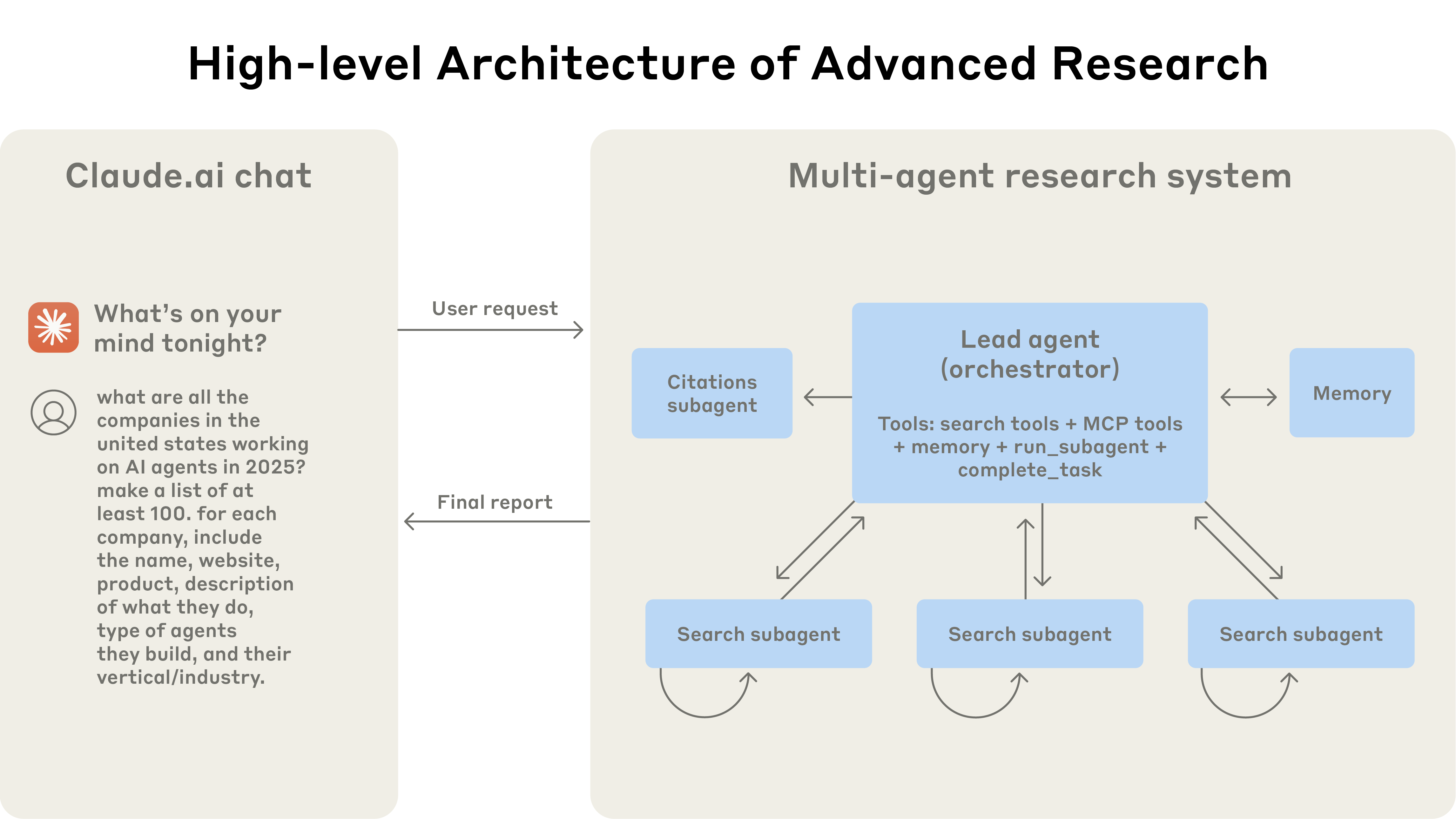
  2. @AnthropicAI, "How we built our multi-agent research system", June 2025. How Research in Claude works: a lead agent plans the search and hands parts of it to subagents that run in parallel. The limits are there too. By their numbers, these systems use about 15x more tokens than a regular chat and pay off on broad tasks with many independent directions. Most coding tasks, they write, don't parallelize as well. And they started evaluating with twenty queries instead of waiting for a big test set. https://www.anthropic.com/research/multi-agent-research-system

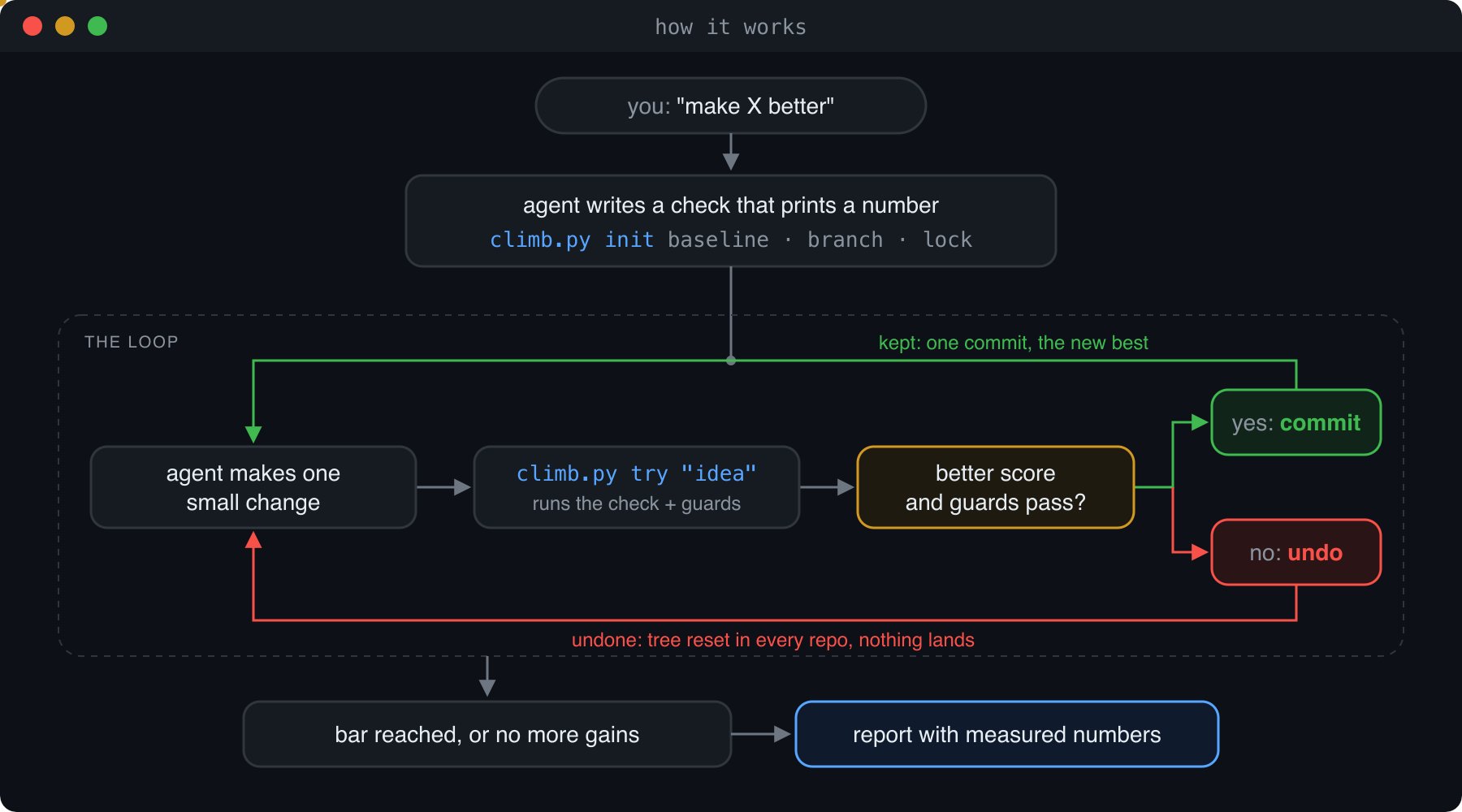
  3. Hill Climb, a skill for Claude Code and Codex by @bil0090, inspired by @theo's hill climbing workflow. The README puts it this way: your agent says "done", Hill Climb makes it prove it. The agent writes a check that prints a number, and the script locks that check. Then the agent moves in small steps: a step that improves the number and doesn't break old tests gets committed, everything else is undone. If the agent edits the test itself, the step is refused. State lives on disk, so after context compaction the agent doesn't start over. https://github.com/Bil0000/Hill-Climb

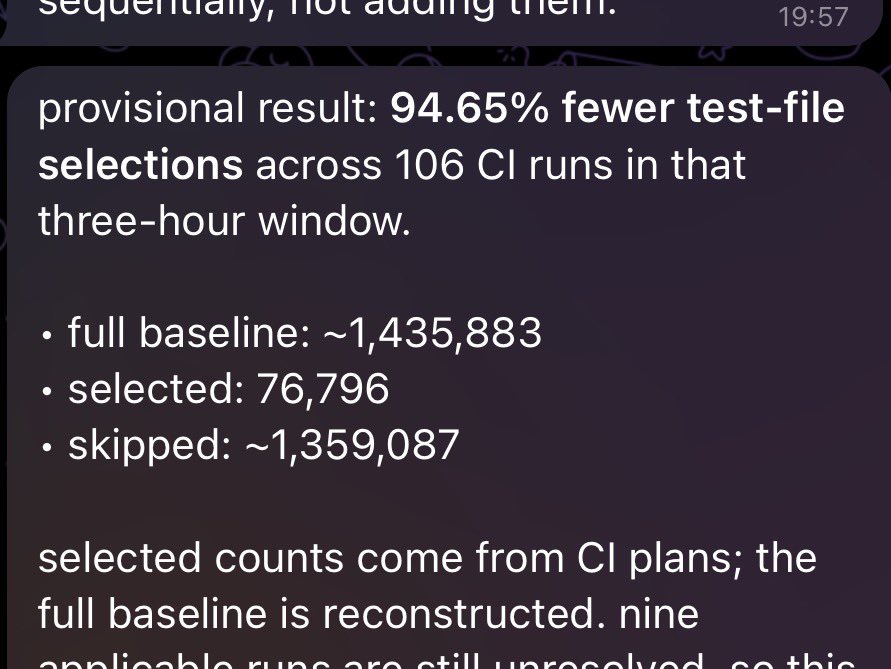
  4. @vincent_koc on adaptive testing in CI. The idea is to run only the tests a change needs, not all of them. He says this cut his CI costs by another 95% on top of an earlier 80%. The screenshot he posted shows a provisional measurement so far: 106 runs over three hours. He promises a write-up and an open library later. https://x.com/vincent_koc/status/2118678559334269318

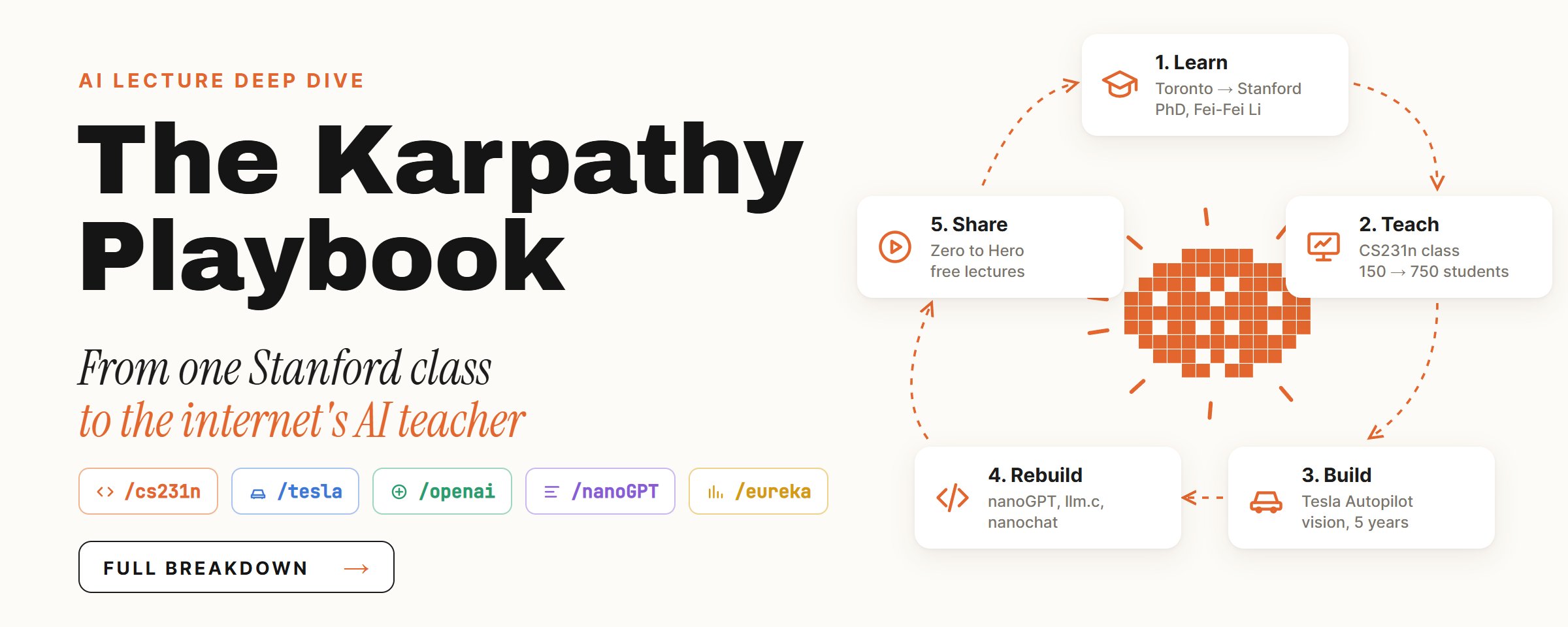
  5. "The Karpathy Playbook", an article by @DmitroCP on X. Not about agents, but about the same habit. For years @karpathy has taken something complicated, rebuilt a small version from scratch and explained it so anyone can follow: the CS231n course, nanoGPT, the Zero to Hero series. The article ends with a one-month plan: pick one concept, build a toy version, record an explanation without slides, and publish the code with the video. https://x.com/DmitroCP/status/2114303402083856499

Article · 1 min read · EN

Choosing a self-hosted MCP gateway

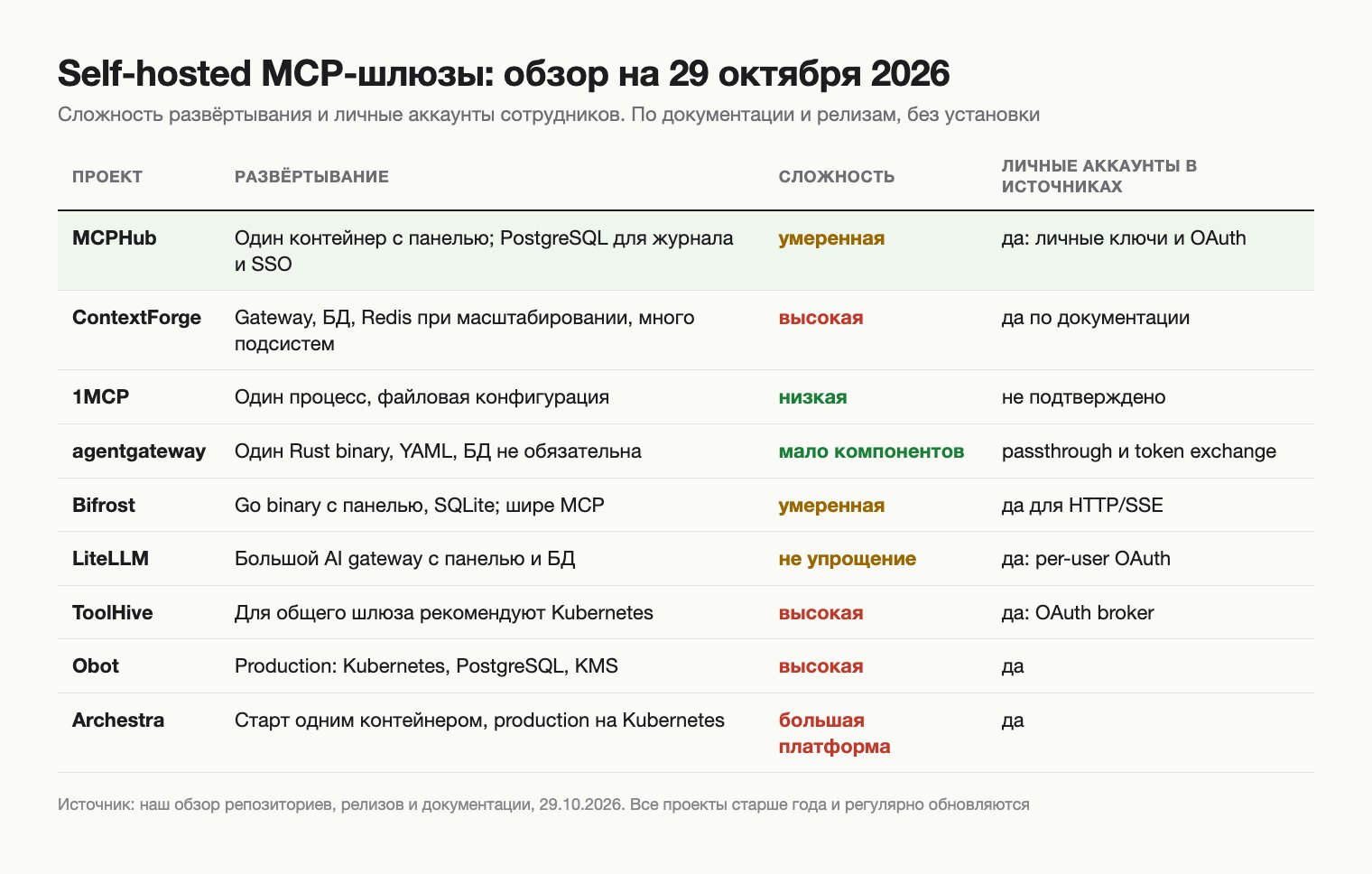
Once several agents and people share the same tools, sooner or later you'll need an MCP gateway: one place for all MCP connections, users, their permissions and personal tokens. We were picking one and did an overview of self-hosted options. Only living projects older than a year with regular releases; we looked at docs and releases as of October 29.

The main thing to look at: letting an employee call a tool and calling a service under that employee's own account are different things. OAuth support alone doesn't guarantee the second.

MCPHub (@samanhappy, https://mcphub.app). One container with a dashboard, personal keys and OAuth per employee, tool search. We chose it and use it.

ContextForge (@IBMDeveloper, https://ibm.github.io/mcp-context-forge). Detailed permissions and teams, turns REST into MCP, but lots of subsystems.

1MCP (https://docs.1mcp.app). The lightest infrastructure, easy to manage from agents. Per-employee accounts aren't confirmed in its docs.

agentgateway (@agentgateway, https://agentgateway.dev). A single Rust binary with detailed policies. Personal key storage and a request log are on you.

Bifrost (@getbifrost, https://www.getmaxim.ai/bifrost) and LiteLLM (@LiteLLM, https://www.litellm.ai). Make sense if you also need a model gateway with keys and budgets.

ToolHive (@StackLokHQ, https://docs.stacklok.com/toolhive), Obot (@Obots_ai, https://obot.ai) and Archestra (@archestra_ai, https://archestra.ai). Strong, but these are platforms, with Kubernetes in production.

We dropped MetaMCP, MCPJungle and Unla: releases are rare.

For a small team my order is: MCPHub; agentgateway if you want the fewest components and are ready to write policies yourself; 1MCP if a simple access model is enough.

Article · 2 min read · EN

Incus: system containers and VMs with one tool

If you know Docker and you know that virtual machines exist, Incus is easy to place: one tool that runs whole Linux systems in containers and, when you need it, real virtual machines. Same commands, and resource limits are set the same way, as instance options.

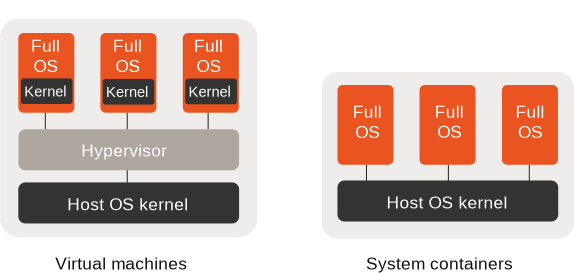
Virtual machines vs system containers, from the Incus docs

What it is

Incus is an open source manager for system containers, application containers and virtual machines. It started as a community fork of Canonical's LXD and is maintained by many of the same people who created LXD. It runs on any recent Linux distribution, and you drive it with the incus command line or its REST API.

System containers

A Docker container usually packages one application. A system container is a whole Linux system: systemd, a package manager, users, SSH, several services at once. Images are published for many distributions: Ubuntu, Debian, Fedora, Alpine, Arch, Rocky, NixOS and others.

A system container has no kernel of its own. It runs on the host kernel and is isolated with namespaces and cgroups. The docs describe the overhead as extremely low, so many of them fit on one machine.

incus launch images:debian/13 dev
incus exec dev -- bash

Incus can also run regular application containers from OCI images, Docker Hub included.

Virtual machines

Some things don't belong in a container: a different OS such as Windows, your own kernel or kernel modules, full PCI passthrough. For those Incus starts a VM through QEMU. The commands stay the same, you just add --vm:

incus launch images:ubuntu/24.04 build --vm
incus console build --type vga

A built-in agent gives VMs the same incus exec and file transfer as containers. The graphical console works through a SPICE client, even before the agent is running.

Limiting resources

Limits are ordinary instance options: limits.cpu (a number or a range of CPUs), limits.cpu.allowance (containers only: a percentage for a soft limit or a time slice like 25ms/100ms for a hard one), limits.memory, plus disk and network I/O. Usually you put them in a profile, a named set of options and devices that can be attached to any number of containers and VMs:

incus profile create small
incus profile set small limits.cpu=2 limits.memory=4GiB
incus launch images:ubuntu/24.04 web --profile default --profile small

Incus also exposes metrics for every running instance (CPU, memory, network, disk, processes) on /1.0/metrics in Prometheus format.

The docs give a simple rule: if everything you need works with the host kernel, use a system container; if you need a different kernel or OS, use a VM.

What runs on my server

  • A persistent Ubuntu system container for a friend. He can SSH straight into it and use sudo inside, and everything survives restarts. Root inside maps to an unprivileged user on the host, and the server's internal services aren't reachable from the container. Its CPU and memory limits are ceilings without reservation.
  • A server for getbb.
  • GitHub Actions runners in VMs: Linux for private repos, a separate Linux VM for open source, and Windows Server for desktop builds. The Windows VM starts when jobs show up in the queue and shuts down after 15 minutes of idle.

Docs: https://linuxcontainers.org/incus/docs/main/

PublishedDEV, 11 Nov 2026

Article · 1 min read · EN

Hindsight as shared memory for agents

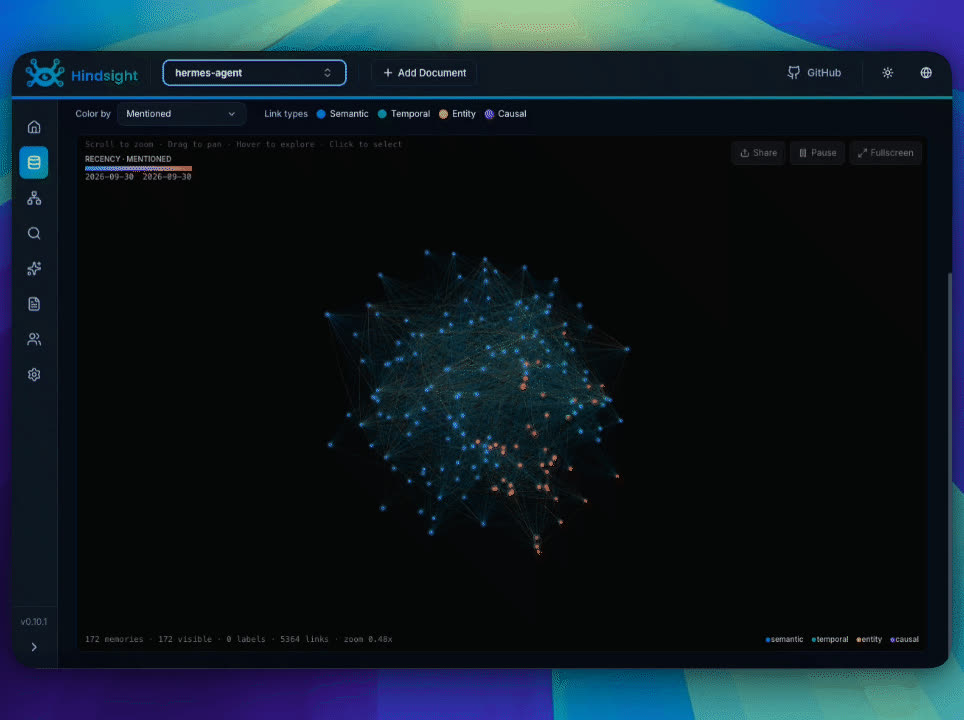
Hindsight is memory for AI agents. Open source under MIT: you can self-host it or use their cloud.

The problem is familiar: an agent starts from a blank page every time. What was decided last week, why an option was dropped, who owns what. You either paste it into the prompt by hand or lose it. And with several agents plus people around them, everyone remembers their own piece.

Hindsight has three operations. retain: the agent hands over a conversation, a document or a decision, and Hindsight pulls out the facts, people, relations and dates. recall: the agent asks what is known about a topic and gets facts with a link to the source. reflect: the memory reasons over everything it has and answers the question as a whole.

Unlike plain RAG, it stores facts rather than chunks of text, and those facts get refined over time: a new decision replaces the old one. Unlike lightweight local memory such as holographic in Hermes, it is a shared service. Different agents and people can read and add to the same memory: every bank has its own MCP endpoint, and there are ready integrations with Claude Code, Codex and dozens of other tools.

In Hermes it is a built-in memory provider: install the plugin, pick hindsight, and the agent starts remembering and recalling on its own. That is how we connected our agent at Jupid, and moved everything it remembered before into the shared memory.

Setup was painless: one container next to our Postgres, local embeddings, and the LLM through a subscription we already had.

What I'd recommend:

  • one shared memory for the team beats everyone having their own;
  • memory is not the source of truth. Keep decisions and statuses in Git and your tracker, and let memory tell you what was discussed and where to look. reflect does get things wrong or out of date;
  • don't dump everything in. We keep agent chat logs out of it.

Article · 4 min read · EN

How one day turns into a dream

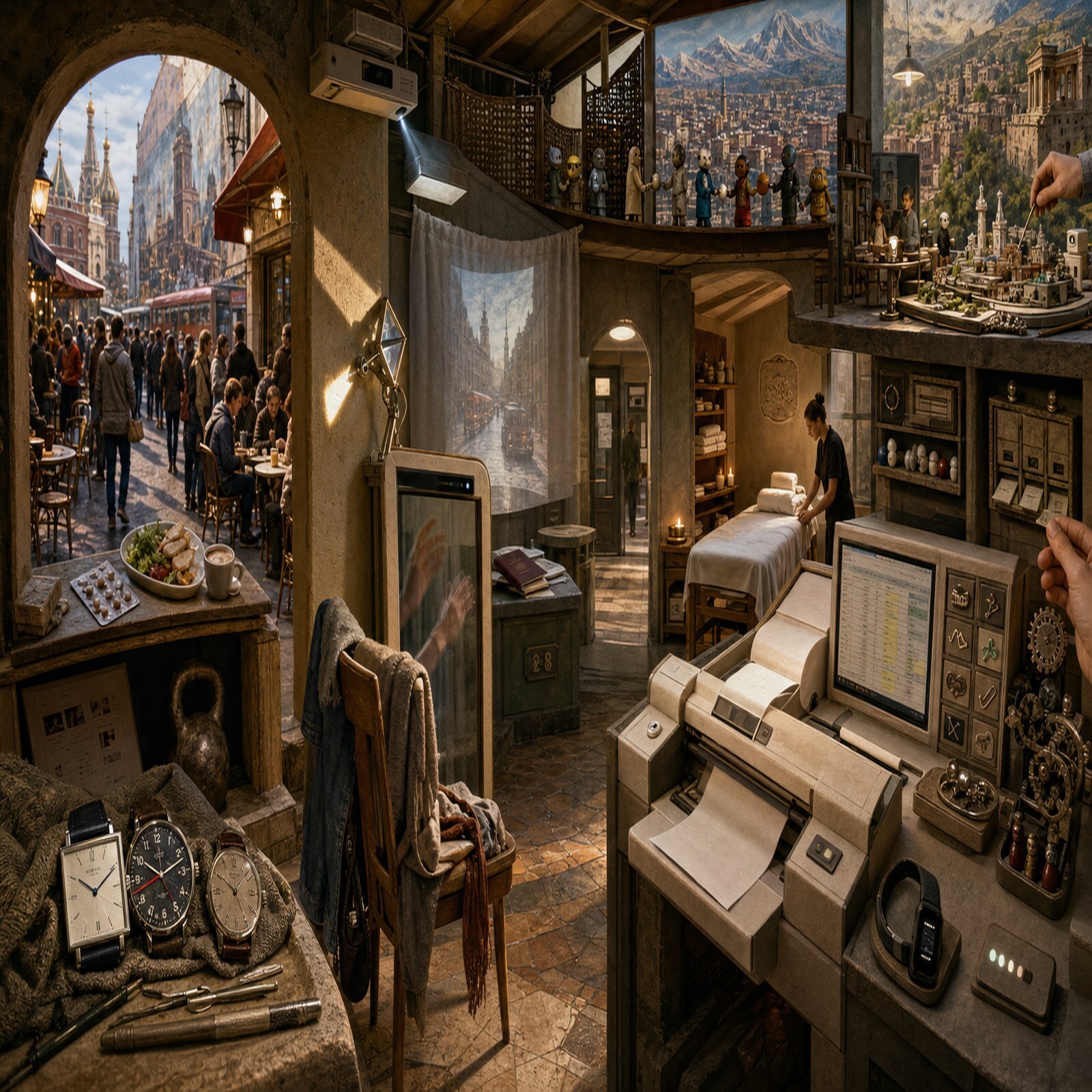
Every morning, Baus takes the traces of the previous day and turns them into one image. Not a report, and not an illustration of the main event. More like a dream where conversations, purchases, work, random objects, and thoughts I will return to later all end up next to one another.

July 23 is a good example of how this works. The day accumulated 18 conversation sessions, two daily notes, and four calendar events. They became 12 short stories and 25 items in the main visual vocabulary. The public caption for the image was very short:

Watches · delayed mirror · queue · roll-paper desk

A Baus dream based on the events of July 23, 2026.

The image was published on July 24 in a Telegram Story and on two X accounts. It is a real result of the production process, not a reconstruction made for this article.

What it was made from

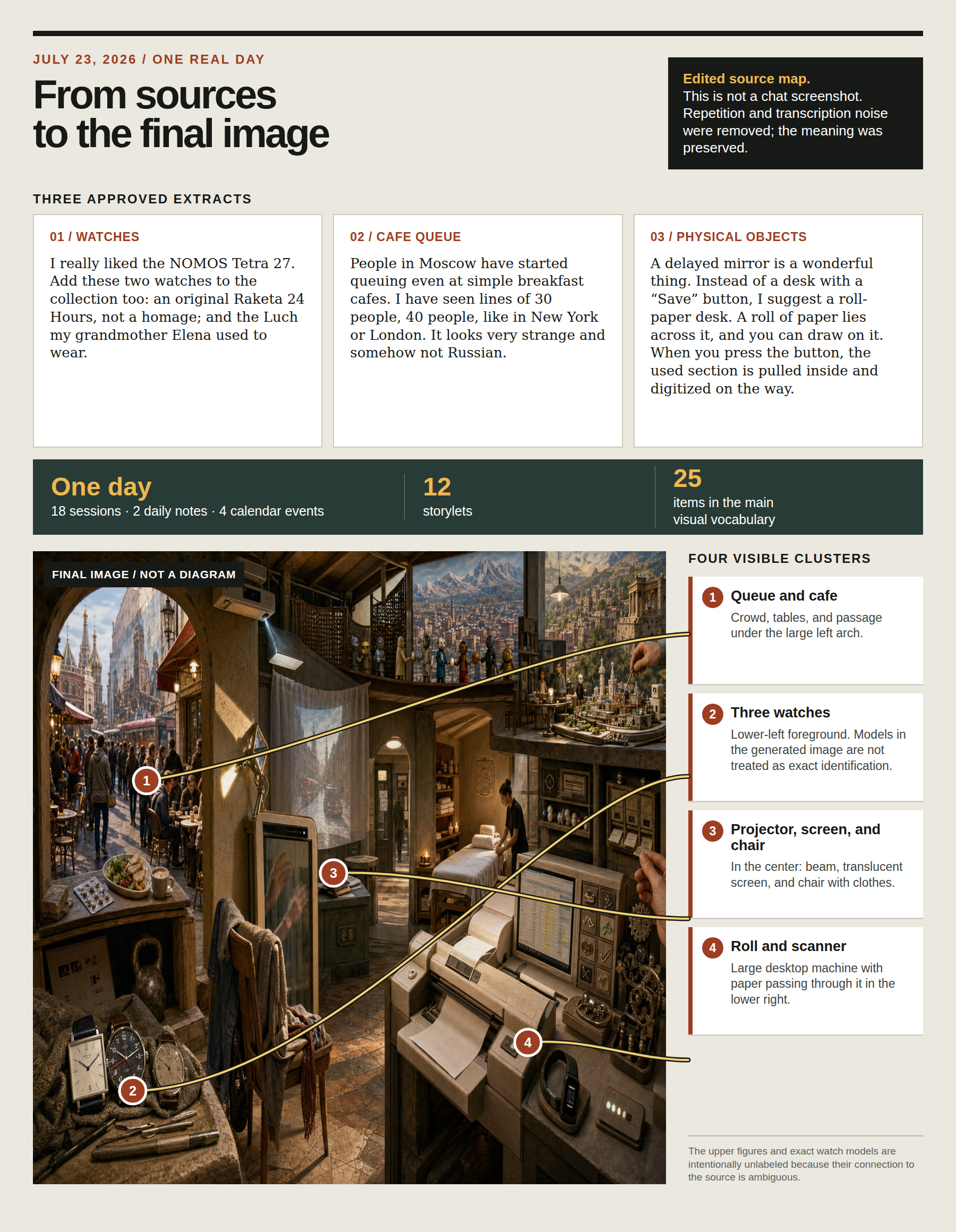
That day I wrote that I really liked the square NOMOS Tetra 27. Then I asked to add an original Soviet Raketa 24 Hours and the Luch my grandmother Elena used to wear to the collection.

I also dictated an observation about Moscow:

People in Moscow have started queuing even at simple breakfast cafes. I have seen lines of 30 people, 40 people, like in New York or London. It looks very strange and somehow not Russian.

In another conversation, we were coming up with simple physical objects. I liked the mirror that shows your reflection with a five-second delay. Instead of an overly complicated desk with a “Save” button, I suggested a roll-paper desk: you draw on the paper, press a button, and the used section is pulled inside and digitized on the way.

These were not three stories prepared for the image. They were simply three different conversations during the day. The source also contained household objects, work on a presentation, and several technical tasks.

Edited source extracts, the intermediate substrate, and four visible motifs in the final image.

Edited source map. Repetition and transcription noise were removed from the quotations; the meaning and wording were preserved. Personal topics not needed for this analysis were left out.

A queue outside a cafe appeared in the left arch of the final image. Three watches lie at the bottom. A screen with a projector stands in the center, with a chair and clothes beside it. On the right, paper passes through a large desktop machine. Other work and household objects remained in the frame too.

Not every detail can be read unambiguously. The generator does not draw a technical diagram and sometimes combines several source objects into one. That is why the image is stored with the substrate and prompt that were actually used for generation, rather than with an explanation invented afterward.

Facts first, image second

If the model receives the whole day as one long log, the most verbose conversation wins. Usually that is technical work. A short human remark or a small object disappears simply because it takes up less text.

If one main story is selected by hand, a different problem appears. The image becomes a neat illustration of an editorial decision, but it stops being a dream about the whole day.

So the work is divided into several steps.

  1. Messages, daily notes, and the calendar are collected for one calendar day.
  2. Transport noise is removed: tool calls, repetitions, service statuses, and answers quoted in full.
  3. A separate pass writes short factual storylets and a list of concrete things, places, and actions. It does not choose a main story.
  4. The generator receives all the storylets and the full visual vocabulary. It may change scale and combine spaces, but it must not invent a new event.
  5. The result, exact prompt, source storylets, caption, dimensions, and hash are stored together. Publication happens separately.

For July 23, the intermediate file contained 12 storylets and 25 items in the main visual vocabulary: three watch models, a queue of 30 to 40 people, a chair with clothes, a mirror and projector, a roll of paper, a scanner, and other things from real conversations.

Other days

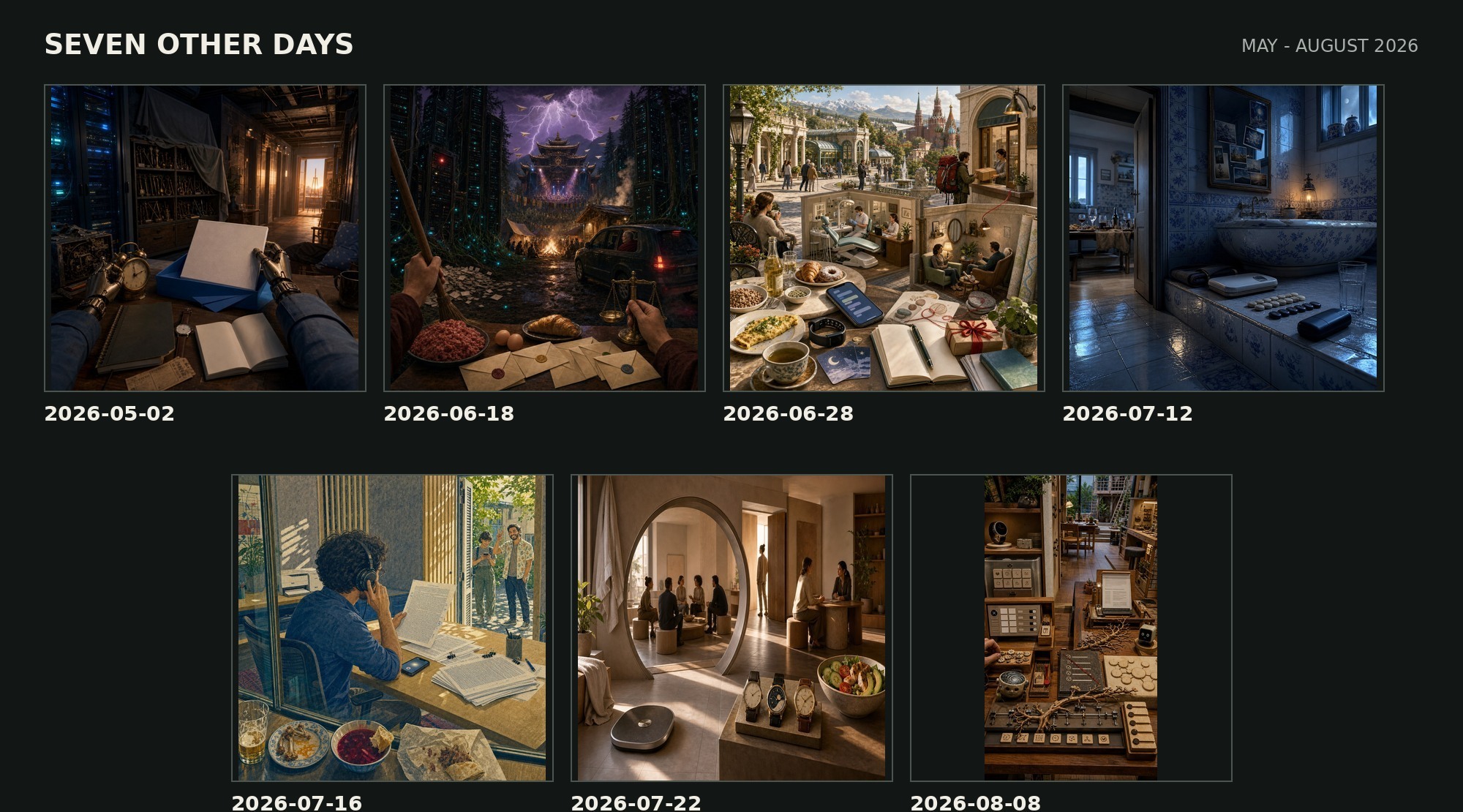
Seven other images from the same series.

Seven other days from May through August. This is not a complete history of the series or a ranking, but a short sample of its range: a server room, a bright city, a blue ceramic scene, a printed interior, a sterile void, and a small workshop.

The series broke in different ways many times. Sometimes the whole day turned into a server room. Sometimes food took up half the frame. Sometimes repetition of my name produced several identical Sergeys. After an overly strict list of allowed objects, the result for July 22 was clean and almost empty.

But the main way to understand these failures is always the same: look separately at the source, the intermediate substrate, and the final image. If the next dream turns out to be entirely about watches again, I can check whether the day really was about watches or the generator simply chose the most convenient object.

PublishedDEV, 7 Nov 2026

Article · 1 min read · EN

Choosing an Orient Bambino

I'm choosing an Orient Bambino, and it turned out to be hard. There are about eighty different ones, and Orient doesn't even call them Bambino on its own site. There they're Classic & Simple Style.

Basically it's the same watch every time: round steel case, domed crystal, an automatic movement you can also wind by hand. All the difficulty is in the details. Sizes from 36 to 41.5 mm, a white, green, gradient or sun-and-moon dial, a strap or a bracelet.

Right now I keep going back and forth between these three. The green gradient at 40.5 mm, which only came out in March. The simplest white one, but smaller, 38 mm. And the dark green open heart: that's when there's a window cut into the dial and you can see the balance wheel swinging. For some reason I find it really fun to think about.

There are also versions with Arabic numerals. A black one with a small seconds hand and big 12, 3, 6 and 9. And green ones where the numerals are actually Arabic, the way they're written in Arab countries: ١٢ instead of 12. They're fun, but I'm not sure about those yet.

And the Sun & Moon I tried on in a store this summer is a Bambino too.

Article · 1 min read · EN

Five years in SlothMud

I spent about five years living in SlothMud. It’s a text-based multiplayer RPG with classes, spells, monsters, and tens of thousands of rooms with descriptions and stories.

We spent days, nights, entire summers there. Went on quests, developed our characters, played with hundreds of people from around the world. You could log on at night and meet people from the US. Just being able to play together like that blew my mind.

We studied guides and wrote scripts, then complex programs that helped us play and automate our characters. That was when I started coding seriously. We even built our own servers using open-source MUD engines to bring our own fantasies to life.

Now I’m curious about what living text worlds built on LLMs could be like. Characters you can talk to in your own words, and stories that develop in response to what you do.

My brother is making an LLM-based game inspired by dreams.

Article · 2 min read · EN

A day on my main Telegram account

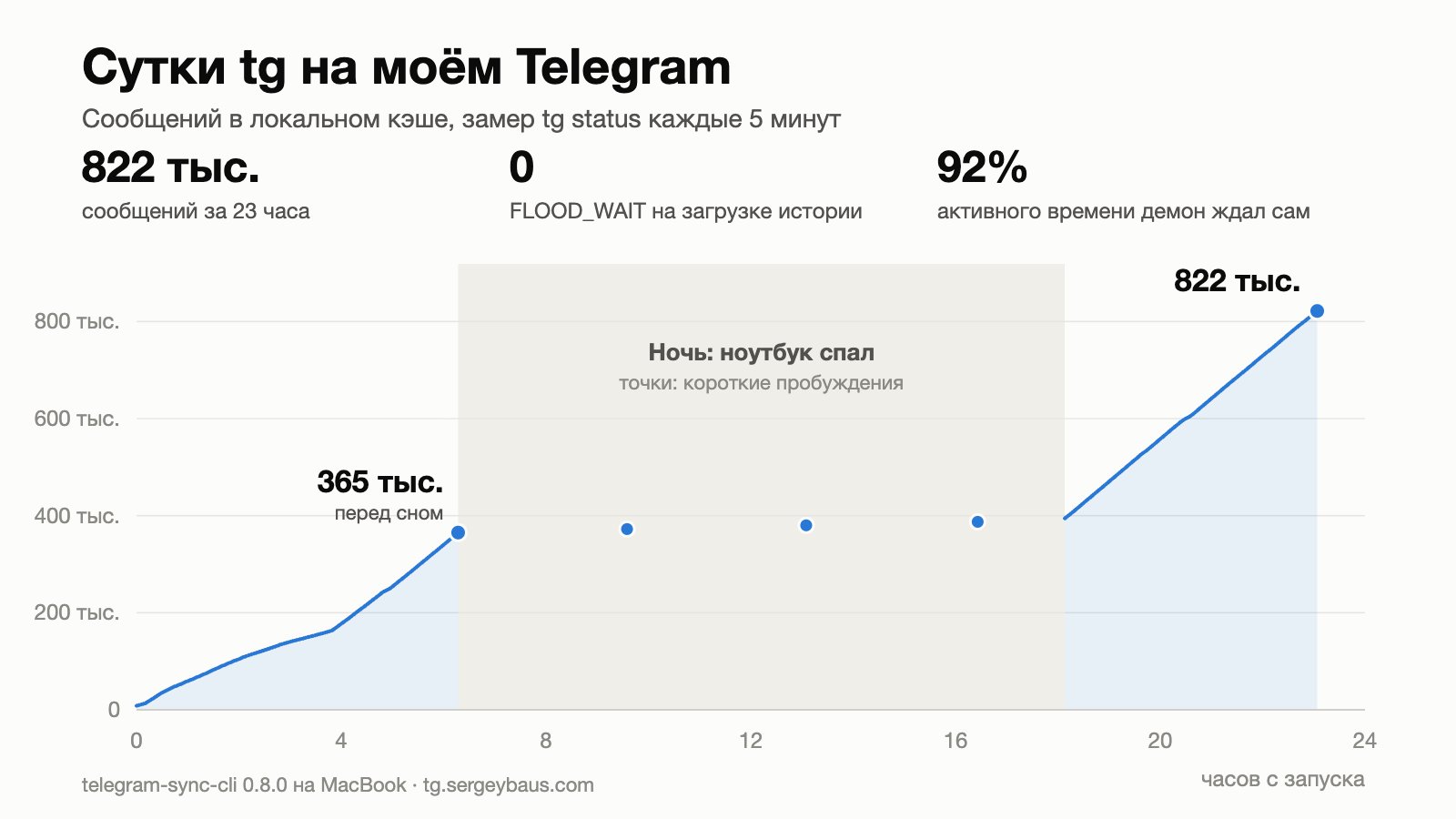
I put tg on my main Telegram account and left it running for a day. tg is my Telegram CLI: it keeps your chats in a local SQLite database, so you or your agent can search them and run SQL. The daemon had never run on my account before. An agent wrote down tg status every five minutes, which is where the chart comes from.

In 36 seconds it found almost 3,000 dialogs and queued the history of more than 2,500 chats: DMs and small groups in full, big groups and channels only on request. Then it just kept downloading. The laptop slept at night, and the daemon never crashed or restarted. After 23 hours the database held 822K messages, 1.2 GB on disk.

The interesting part is why it took that long. Telegram never once asked it to wait while it downloaded history. The daemon spent 92% of its active time waiting on its own: by design it makes one call every three seconds, to be safe. On a test account Telegram starts throttling at about one call per second, so tg was about 3.5 times more polite than it needed to be. Next I'm making the pace adaptive: start faster, back off when Telegram asks. By my estimate an account like mine would then sync in 3–4 hours of active time instead of 11.

Search is already fast: 40–75 ms per query over 290K messages, and prefix queries like word* match every form of a word.

The day also found bugs you don't see on test accounts. After the laptop woke up, the daemon reconnected but didn't catch up, so one group was missing four overnight messages until a restart. Some history pages lost their senders, so about 9% of messages showed no name in search. And usage stats delayed every command by half a second. All three are fixed in 0.9.0, out yesterday. It also makes tg status show how much history is left and roughly how long it will take.

And what a real account looks like: 1,112 of my chats have ten messages or fewer, while 19 chats hold almost half of everything.

brew install neoromantic/tap/tg

https://tg.sergeybaus.com/?utm_source=x&utm_medium=social&utm_campaign=tg-day-own-account&utm_content=x-sergeybaus-chart-v1

Article · 1 min read · EN

I built ai-usage to see what's left of shared Claude Code, Codex and Grok subscriptions

I made ai-usage, a small open-source tool for teams where people, servers and bots share a few Claude Code, Codex and Grok subscriptions.

The trouble with a shared subscription is that each machine sees only its own part. A limit runs out in the middle of a task, and nobody knows which machine used it or when it comes back.

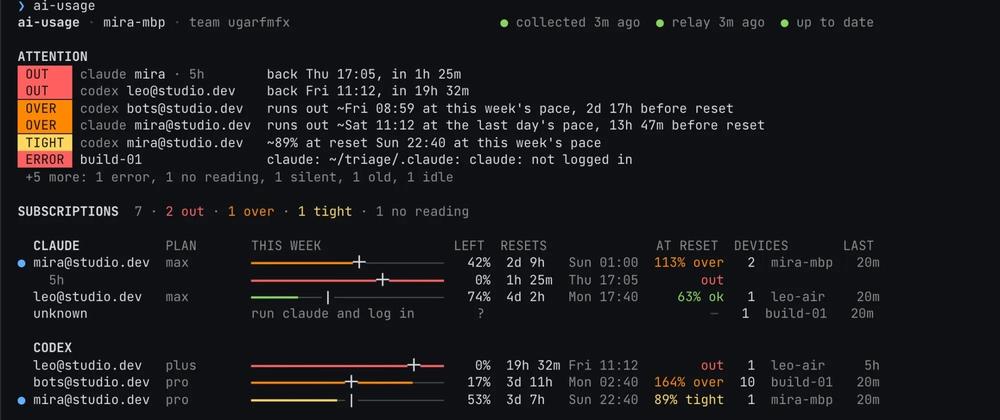
ai-usage gathers usage from every machine into one report. You see what is left in each 5-hour and weekly window, when it resets, and how much each machine used. It also estimates, from your own pace, whether a subscription will last until the reset. When something is wrong, an ATTENTION block shows up at the top: a limit that is out, one that will run out early, a machine that went silent.

Under the hood it is one small binary. The system scheduler runs it every 15 minutes. It reads what the tools already write on disk, asks the installed tools for their quota, and exits. No daemon, no account, no config file. It doesn't call the providers' APIs, so it spends none of your quota. Prompts and code are never sent, and names, emails and project paths are sealed with your team key before they reach the relay.

There is a menu bar app for macOS 14+, Linux works from the terminal, and ai-usage --json is there for scripts and agents. To try it on macOS or Linux:

curl -fsSL https://raw.githubusercontent.com/neoromantic/ai-usage/main/install.sh | sh

It's free and MIT licensed. Docs and more: https://au.sergeybaus.com/?utm_source=devto&utm_medium=social&utm_campaign=au-launch-2026-10&utm_content=devto-showdev-sharedquota-v1

The screenshot shows a made-up team with demo numbers. Forecasts are estimates, not promises.

I wrote this post with help from an AI assistant. The tool is mine, and I checked every fact.

PublishedDEV, 18 Oct 2026

Article · 1 min read · EN

The value of private context

Software is becoming a commodity. AI makes it easier to build and rewrite. Access to raw data is becoming less of an advantage too: plenty of systems already index documents and correspondence.

The real value is elsewhere: in the “hidden” context you can't get just by connecting to a company's data.

Who is this supplier to us? What did we agree on but leave out of the contract? What do we know about this person from talking to them? Behind the formal terms there may be other business arrangements, mutual obligations, even kickback agreements. A company's documents don't show everything about how it works.

Some of this knowledge is in private notes. Some lives in relationships between people and only comes up in a particular conversation. Someone explains why things are done this way. An agent asks a person or another agent a question and gets an answer that wasn't in any database. The task gets done, the conversation ends, and that knowledge is easy to lose.

I'm developing agents designed to capture exactly this kind of context: notice it as they work, clarify it, and preserve it so their next action takes those relationships and agreements into account. Not just index a folder of documents again.

The cheaper software gets and the more accessible raw data becomes, the more valuable the knowledge that isn't in that data yet. The things that briefly surface in conversation and disappear again unless we pay attention.

Sep 2026

Travel · 6 photos · RU

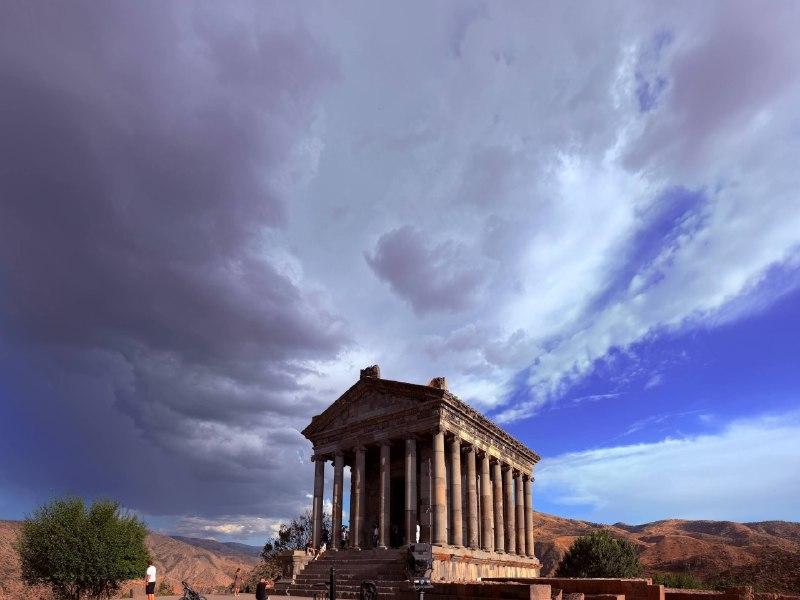
Армения

15 Sep · Armenia

Уже почти уезжаю и только сейчас захотелось поделиться.

Последний раз был в Армении в 2023, с тех пор она стала только лучше.

Лейтмотив у всех: я остаюсь здесь жить!

Но нет, уезжаем дальше

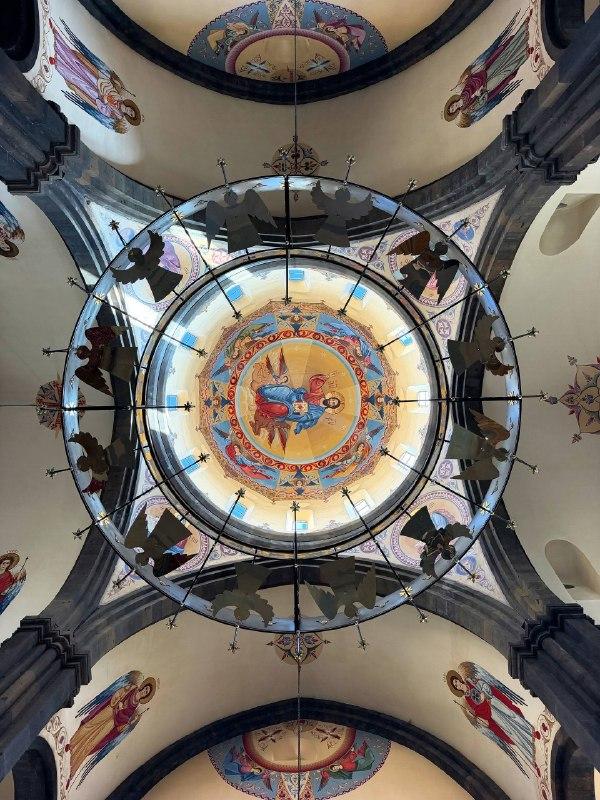
Armenia, Armenia, photo 1Armenia, Armenia, photo 2

Telegram PetrovMoves, 15 Sep 2026 · X @neoromantic (RU)

Article · 2 min read · RU

Червяковая визуализация перемещений

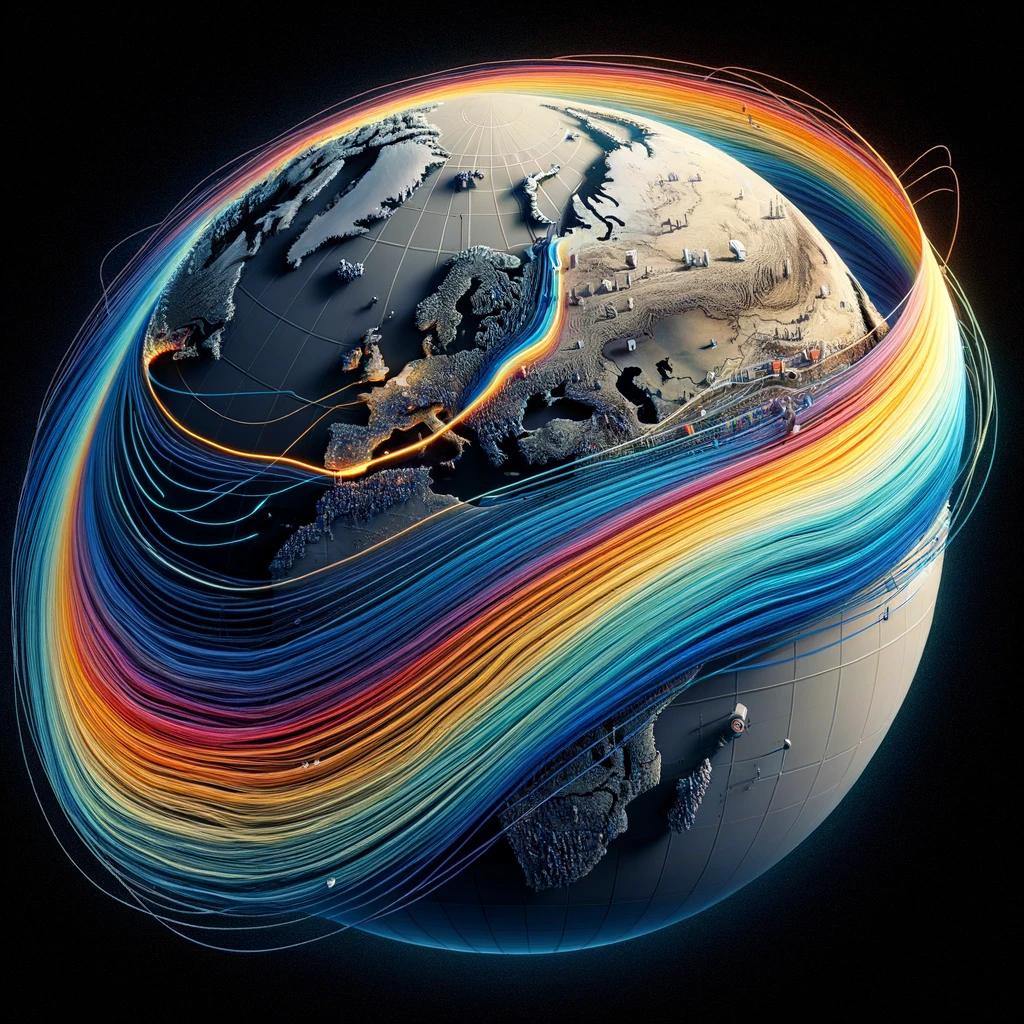
В связи с тем, что я собираю метрики своей жизни, и это включает ежедневное местоположение, то появилась мысль как это показать и опубликовать. Иллюстрация маршрута путешественника

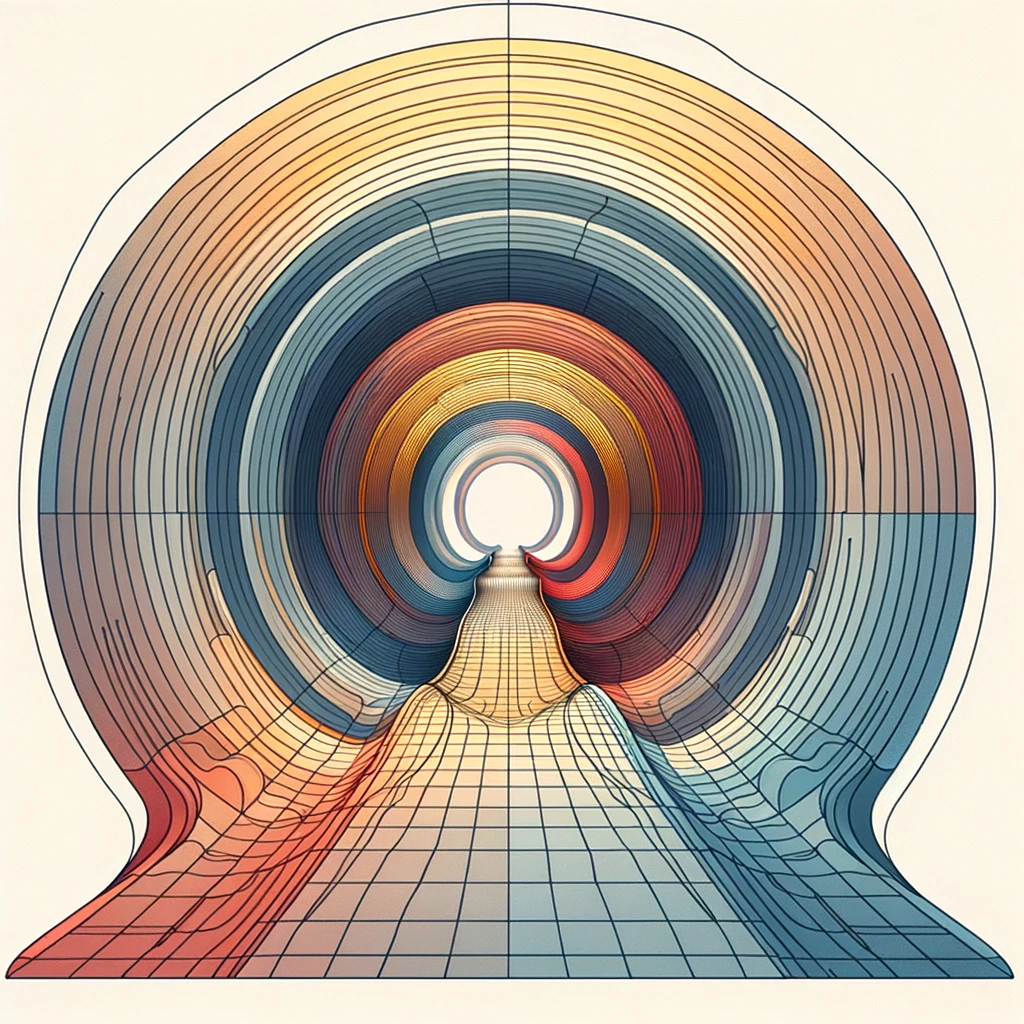
В одной фразе: нарисовать непрерывный путь на глобусе или карте большого масштаба, где толщина пути обратнопропорциональна времени, проведенному в этом месте; а цвет плавно меняется (или затухает) по мере движения.

Схема перемещений
Схема перемещений

Правила

  1. Путь непрерывен. Даже если ты летишь на самолете 1000км/ч, ты не телепортируешься.
  2. Чем дольше ты в одном месте (непрерывно) — тем визуализация "жирнее" (more prominent)
  3. Но и если покидал его, а потом возвращался, жирнота остаётся. Например, так:
  4. Учитывается время по пути: чем быстрее, тем меньше тебя там было. Не только потому что меньше времени, но и потому что:
    • самолет — будто телепортация, ты пролетал над странами, но можешь этого даже не знать.
    • поезд — ты уже смотришь в окно и реально видишь всю территорию, по которой едешь
    • машина за рулем — может быть так же быстро как поезд, но ты гарантированно знаешь где ты ехал и смотрел в окно на всё что проезжал (а еще переодически останавливался и покупал кофе на заправках и говорил с людьми) то есть — ты объективно более "был" на этом пути, когда был в машине, чем в поезде. Но пока достаточно просто учитывать скорость перемещения. Линии машины жирнее чем самолетные.
  5. Течение времени отражено, вероятно, цветом. Можно фейдить, можно делать медленный цветной градиент. Когда одно и то же место посещено несколько раз (соответственно с разными "цветами"), цвет может смешиваться или становиться по типу пересадок на схеме метро. Схема повторных посещений

В принципе, это должно работать на любом масштабе, не только в масштабах годов и путешествий по странам-городам. Даже в рамках одного дня мы 8 часов спим, пару часов в кафе, быстро-быстро проезжаем от места до места (тонкий червяк), 5 часов сидим в офисе и так далее, можем посетить одно место несколько раз.

Фантазии

  • поискать треки самолетов и для известных рейсов показывать точный путь (а не по геодезическим линиям)
  • указывать mode of transportation и видеть их немного по-разному
  • можно анимировать что-то. Типа текущее место пульсирует, то где не был давно — замерло, а остальные пульсируют медленнее
  • можно давние места "размывать"
    • каждой точке (пикселю) поверхности присвоить цвет
    • каждый день что ты где-то — из этой точки растекается краска
    • цвет растекающейся краски может быть случайный (плавно меняется со временем) или определяться, например, флагом страны или цветом фотографий этого места.
    • краска со временем "выцветает"
    • Тогда выйдет, что hometown где ты сейчас — весь насыщенный и локализованный, а места где был давно — подкрасили страну
      • добавить границы стран и не давать краске протекать за них (может немного)
    • хорошая задача для того чтобы научиться писать шейдеры

Пост в X