Article · 1 min read · EN
Choosing a self-hosted MCP gateway
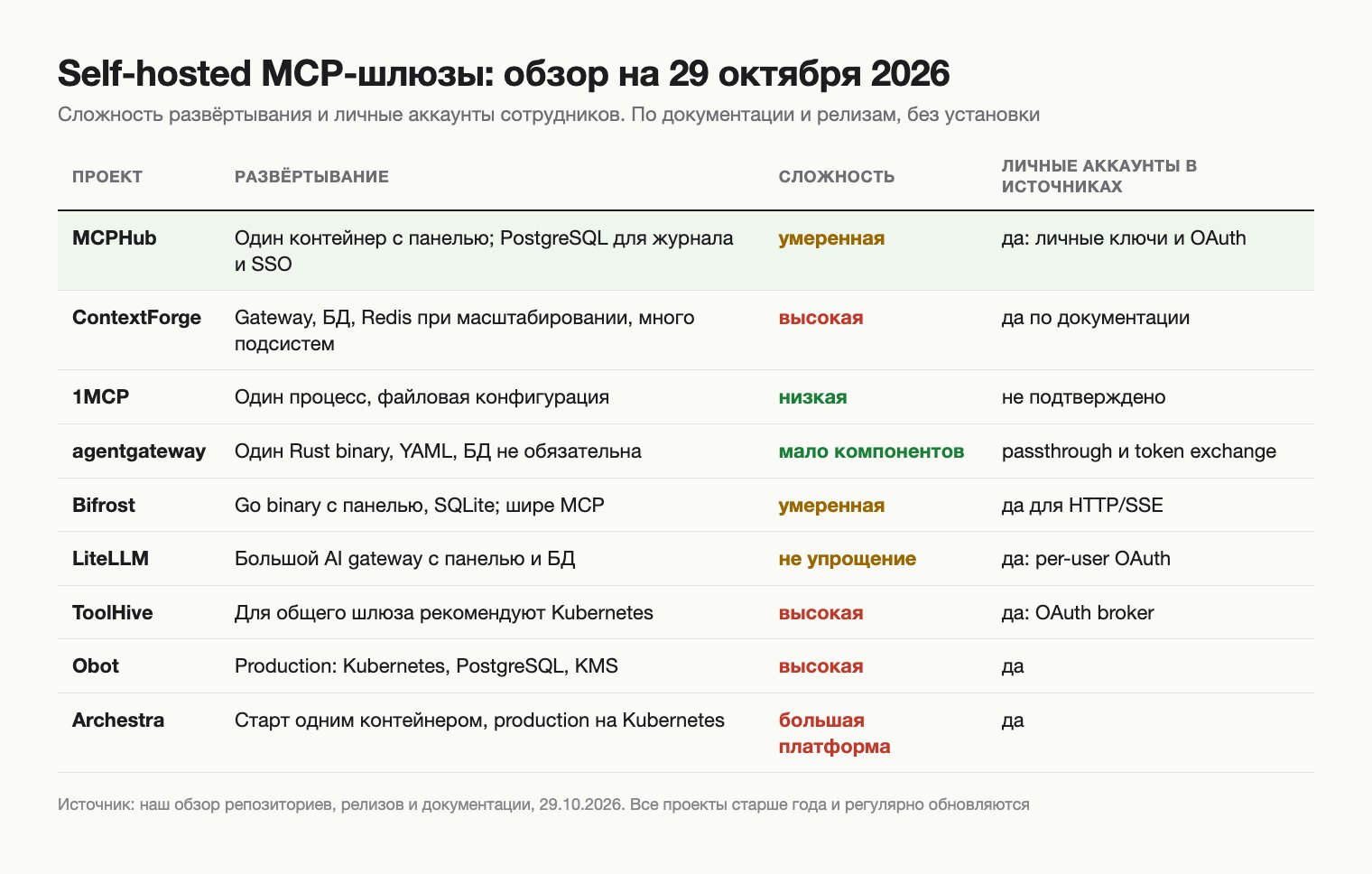
Once several agents and people share the same tools, sooner or later you'll need an MCP gateway: one place for all MCP connections, users, their permissions and personal tokens. We were picking one and did an overview of self-hosted options. Only living projects older than a year with regular releases; we looked at docs and releases as of October 29.
The main thing to look at: letting an employee call a tool and calling a service under that employee's own account are different things. OAuth support alone doesn't guarantee the second.
MCPHub (@samanhappy, https://mcphub.app). One container with a dashboard, personal keys and OAuth per employee, tool search. We chose it and use it.
ContextForge (@IBMDeveloper, https://ibm.github.io/mcp-context-forge). Detailed permissions and teams, turns REST into MCP, but lots of subsystems.
1MCP (https://docs.1mcp.app). The lightest infrastructure, easy to manage from agents. Per-employee accounts aren't confirmed in its docs.
agentgateway (@agentgateway, https://agentgateway.dev). A single Rust binary with detailed policies. Personal key storage and a request log are on you.
Bifrost (@getbifrost, https://www.getmaxim.ai/bifrost) and LiteLLM (@LiteLLM, https://www.litellm.ai). Make sense if you also need a model gateway with keys and budgets.
ToolHive (@StackLokHQ, https://docs.stacklok.com/toolhive), Obot (@Obots_ai, https://obot.ai) and Archestra (@archestra_ai, https://archestra.ai). Strong, but these are platforms, with Kubernetes in production.
We dropped MetaMCP, MCPJungle and Unla: releases are rare.
For a small team my order is: MCPHub; agentgateway if you want the fewest components and are ready to write policies yourself; 1MCP if a simple access model is enough.