Telesec · Open-source Telegram Business secretary
Telegram Business
for Hermes Agent.
Connect your Telegram Business account to Hermes Agent. Read voice notes as text, keep an opt-in history that survives edits and deletions, and build contact dossiers from it.
FreeOpen sourceWhat’s new in 0.19.3
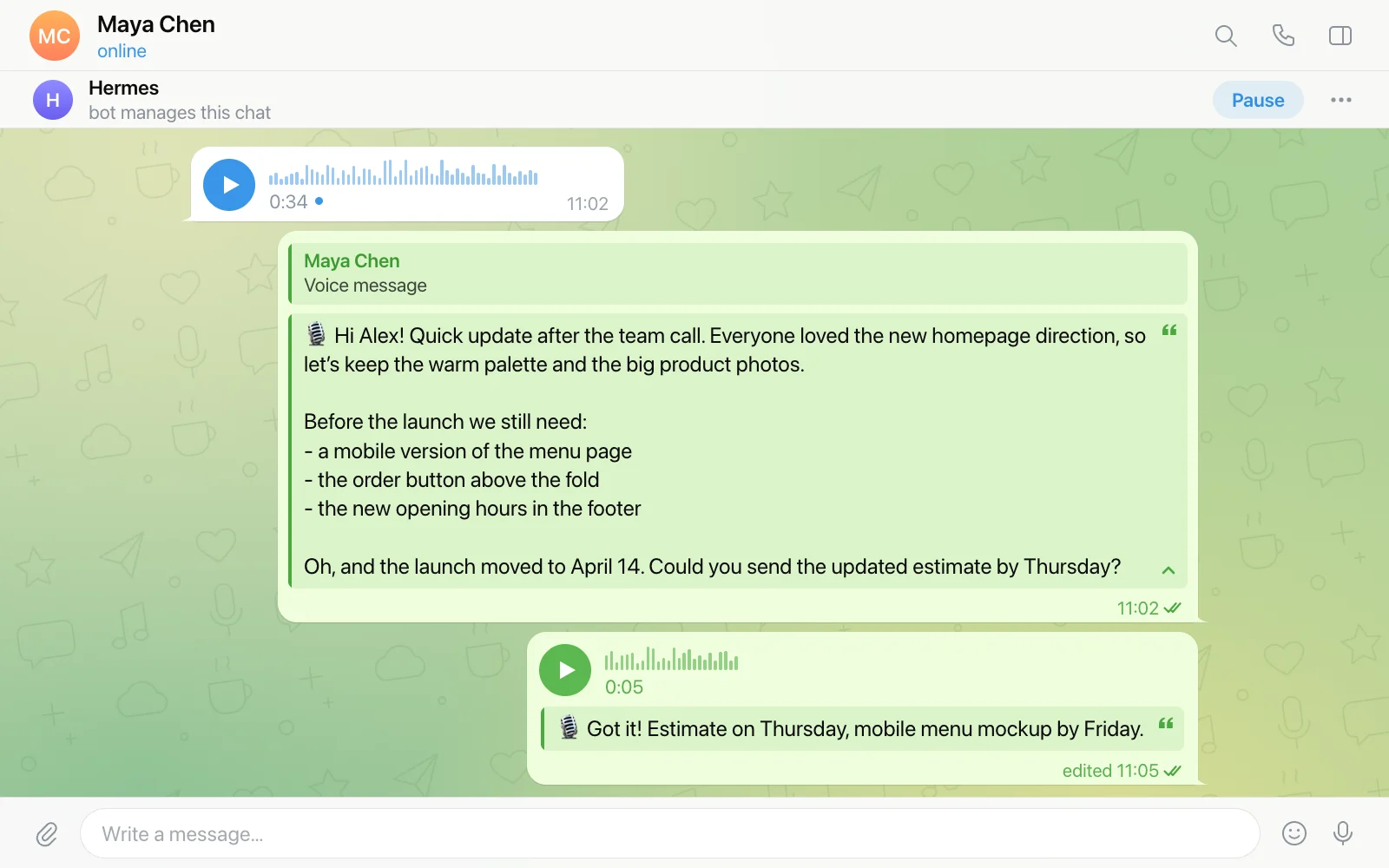
- Voice notes as text
Transcripts arrive in the same chat, without an agent turn.
- History that keeps deleted messages
Opt-in. Every new Business text, each edit, and each deletion, searchable by contact.
- Dossiers built from that history
One short document per contact, corrected by your own note.
Read it in the chat
For when you
can’t press play.
A voice note becomes an expandable transcript in the same conversation, without a full agent turn.
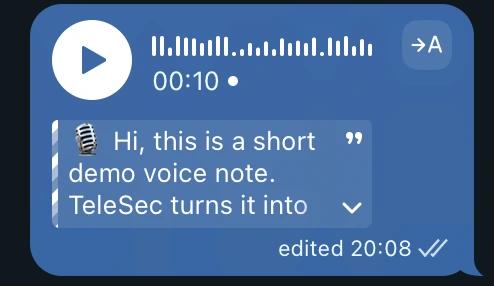
- Voice, video notes, and audio
- Uses the speech provider you already configured in Hermes. Audio attachments pass a short speech probe first.
- Readable, still in your words
- Optional Gemini 3.8 Flash proofreading adds punctuation and paragraphs. Enriched mode can remove filler and structure longer notes.
- One transcript, in the right place
- The raw text appears at once. Cleanup then edits that same caption or reply; there is never a second transcript. Short outgoing notes keep it in their caption, others get a reply.
- Your rules, chat by chat
- Every chat transcribes both sides by default. Pick own, peer, or off for one chat in its owner panel or with
hermes telesec mode. Settings turns transcription off in every chat. - Groups you list, too
- Members’ voice notes, circles, and audio files get a transcript, with no Business account. A recording the bot would answer as text, such as a reply to its message, becomes a spoken request: Hermes answers it in a reply to the recording. Off until you list a group. Set up groups.
Opt-in correspondence history
Deleted in Telegram.
Still in your history.
Every new text in your private Business chats is saved with each edit and each deletion. When a contact deletes a message, you keep what it said. No model needed to capture or search.
In Telegram
Maya Chen
Could you send the revised estimate on Thursday?09:14
Yes, Thursday. The budget we agreed is $12,000.09:14
Deleted by Maya at 11:14
Can we move the call to 4pm?edited 09:18
In your Hermes history
$ hermes telesec history deletions
2026-10-16T11:16:00Z deletion.classified source=deleted_business_messages connection=demo-business chat=2000 message=3 direction=inbound sender=2000 status=unexplained replacement=None reason=no_strong_match score=None

$ hermes telesec history search --contact @mayachen --text deposit --since 7d
2026-10-16T09:15:35Z message.created source=business_message connection=demo-business chat=2000 message=3 direction=inbound sender=2000 text=Perfect. We'll pay the deposit by Friday.

$ hermes telesec history search --contact @mayachen --text call --since 7d
2026-10-16T09:17:00Z message.created source=business_message connection=demo-business chat=2000 message=4 direction=inbound sender=2000 text=Can we move the call to 3pm?
2026-10-16T09:18:00Z message.edited source=edited_business_message connection=demo-business chat=2000 message=4 direction=inbound sender=2000 text=Can we move the call to 4pm?Every version, kept
New messages and each edit are saved in full, so the earlier wording stays readable. Replies and contact names come with them.
Deletions, labelled
A deletion keeps the text. Two minutes later it is labelled a likely correction, a likely duplicate, or unexplained. When nothing explains it, you get a deletion alert.
Find it by who, what, when
Search by name or @username, words, and dates. Export a conversation, or see its stats.
Plain files, on your host
Monthly JSONL in your Hermes profile, text only, kept as long as you choose in Settings. Add a chat’s earlier messages from a Telegram Desktop export.
Correspondence stats
Who writes more.
Who answers faster.
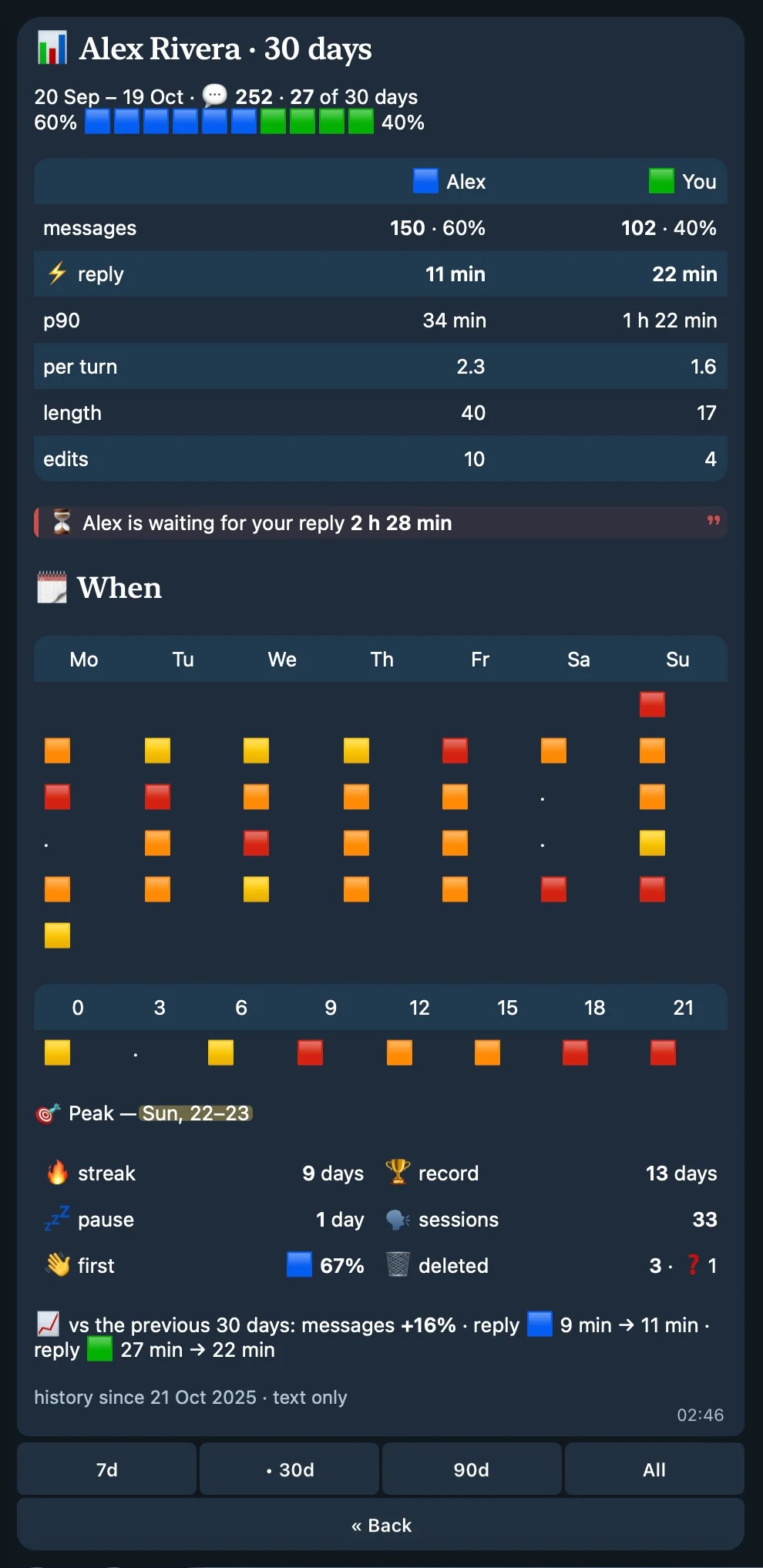
Counted from your history, with no model: a balance bar of who writes more, a table with both sides’ reply times and messages, emoji heat maps of when you talk, streaks, and the change from the previous period.
Your private chat with the bot
In the Business chat
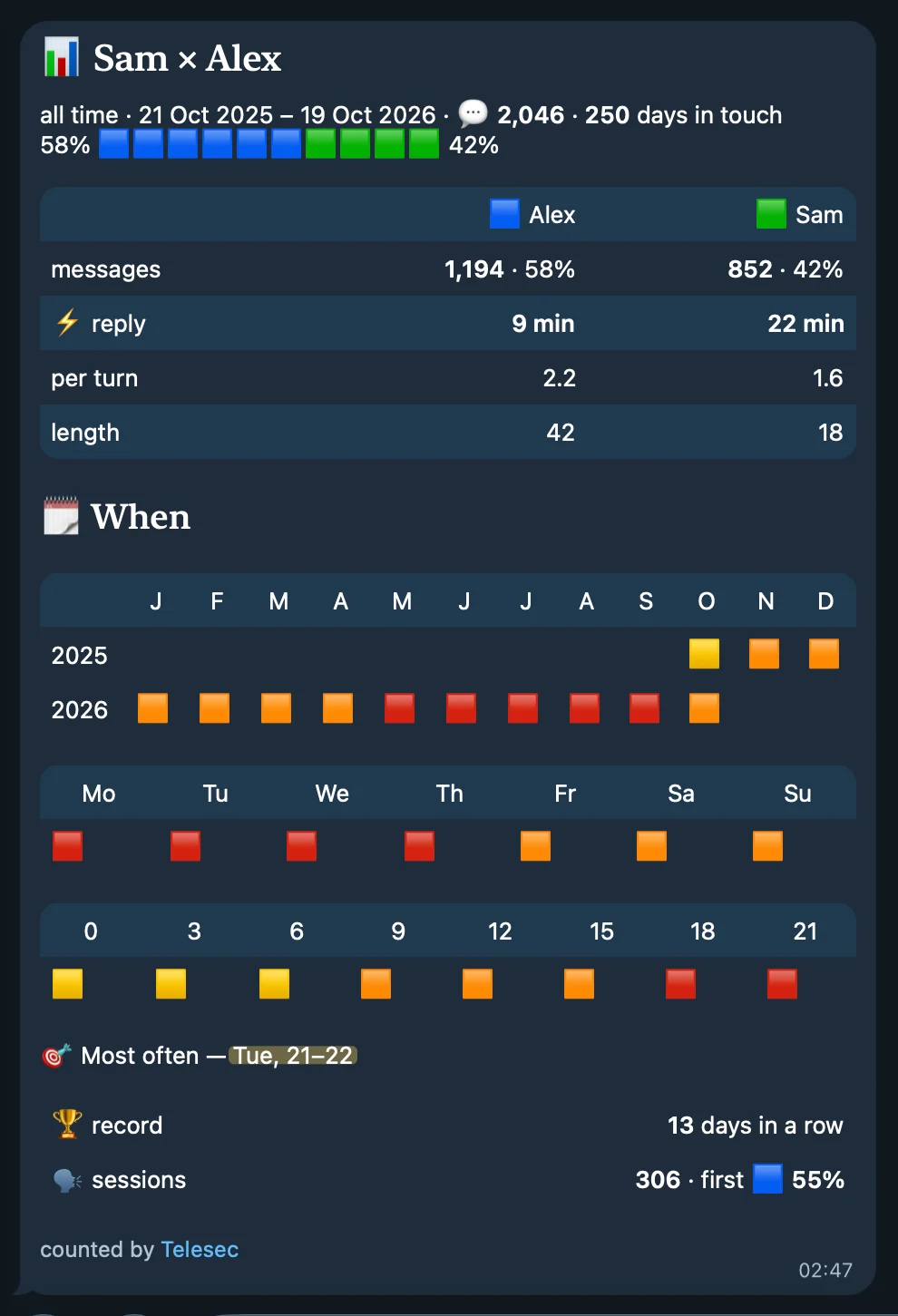
/stats, /stats 30d, or another period in a chat. The bot turns your command into this card, and the contact sees it.Real Telegram screenshots of fictional history. The card never shows deletions, edits, p90, or who is waiting. From the terminal: hermes telesec stats --since 30d.
Contact dossiers
Context you
can correct.
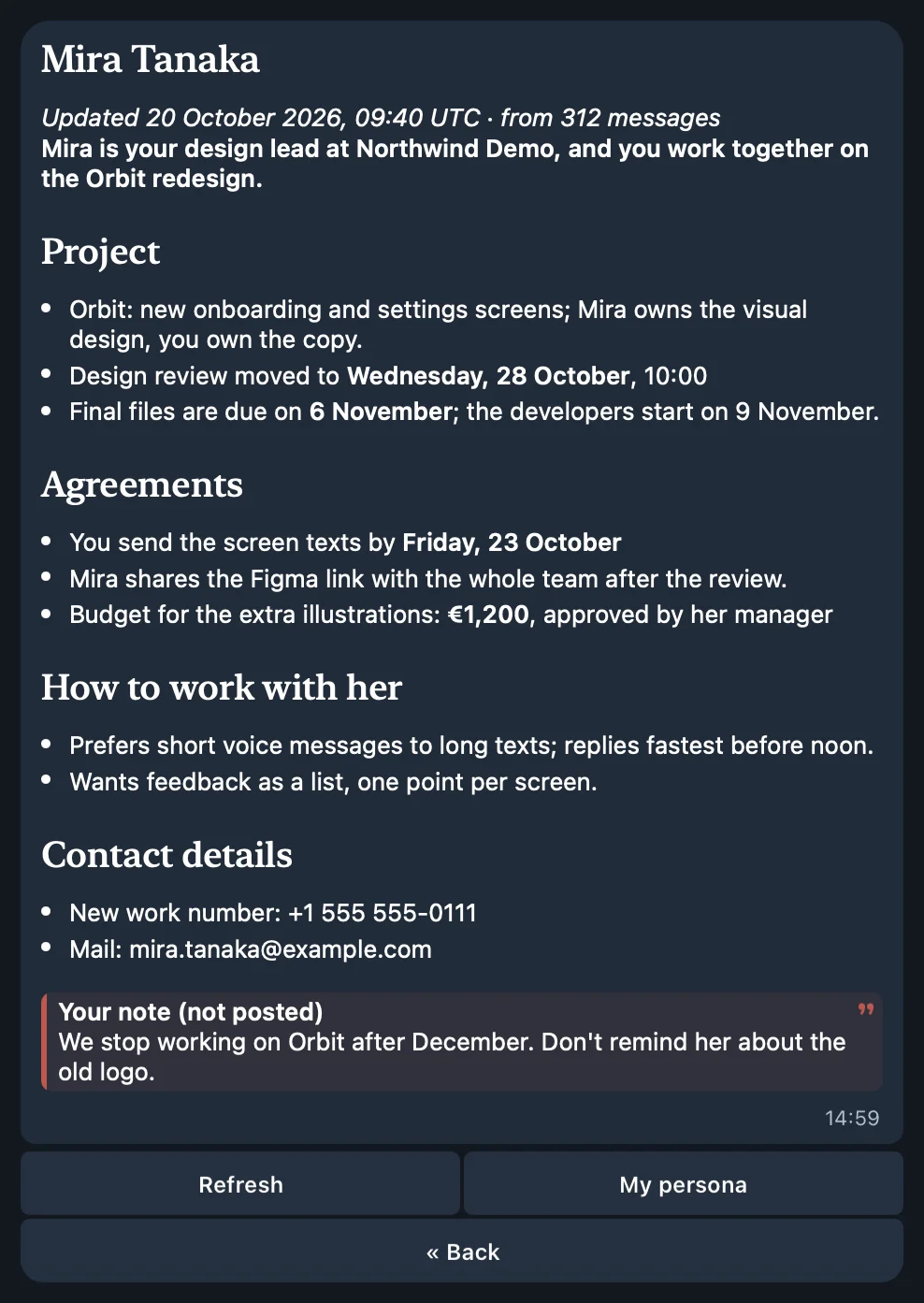
With history on, switch dossiers on in Settings. Telesec keeps one short document for every private contact: who they are, what you agreed, dates and amounts, and open questions. It also learns how you write.
- One document that keeps up
- A few minutes after a chat goes quiet, the model rewrites the dossier with what changed, edits and deletions too. The previous version is kept.
- Your note comes first
- Correct a dossier with one note:
hermes telesec dossier note --contact @mira --append "…". The model follows it, including what to leave out. The note itself is never posted. - In your owner panel
- 📖 Open dossier, next to Stats, shows the document and your note. Refresh rewrites it now, and My persona shows how you write. Only you see this screen. 📇 Dossier ❌ leaves one chat out.
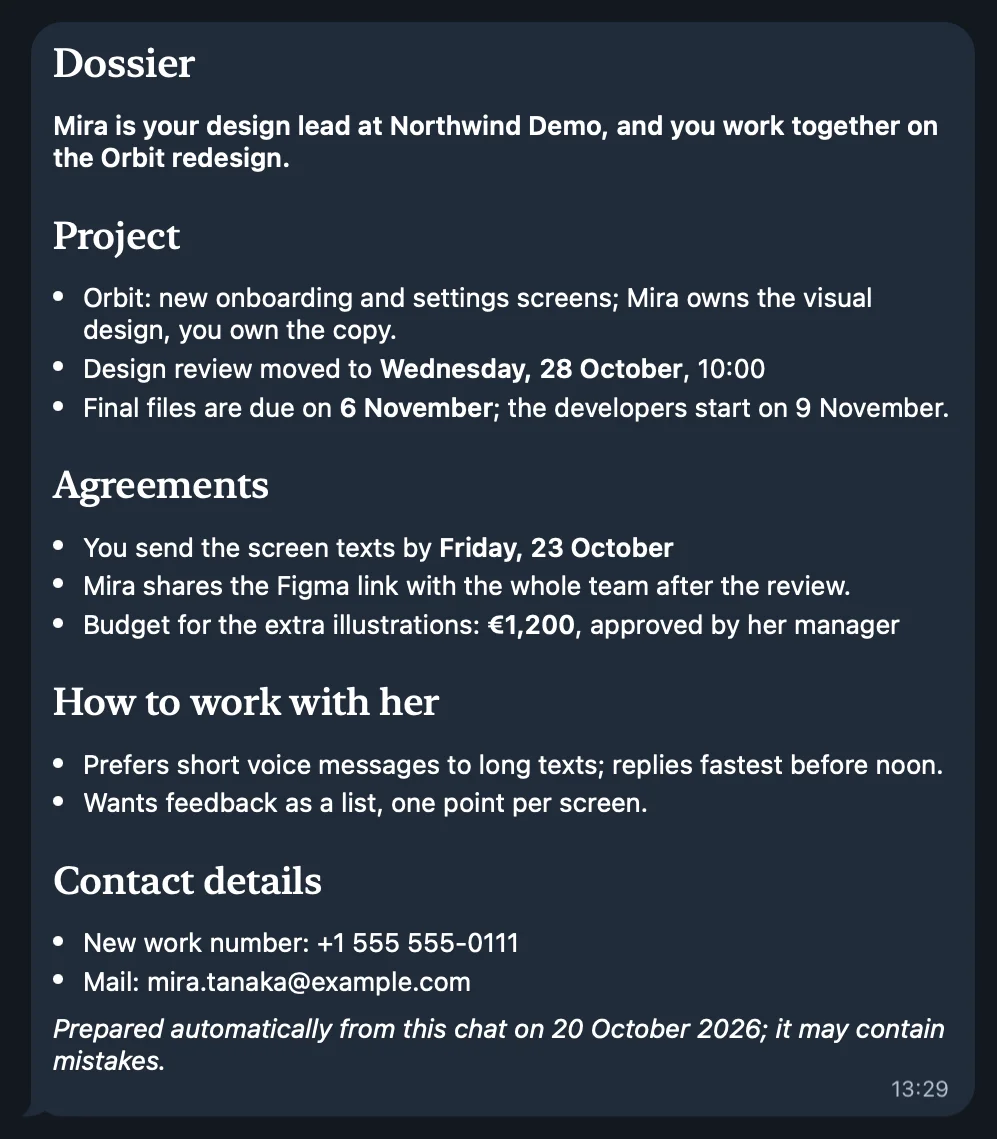
/dossierposts the dossier- Send
/dossierin a Business chat. The bot deletes your command and posts the contact’s dossier, without your note. If the chat changed since the last update, it refreshes the dossier once first. The contact sees it. - Gemini 3.8 Flash, zero data retention
- By default dossiers use Gemini 3.8 Flash through Vercel AI Gateway with zero data retention, as their own Hermes model task. Pick another one in
hermes model. - Planned: replies in your voice
- Drafts you send, edit, or discard, and automatic replies only in chats you choose.
/dossier posts it.Settings · all chats
One tap per feature,
for all your chats.
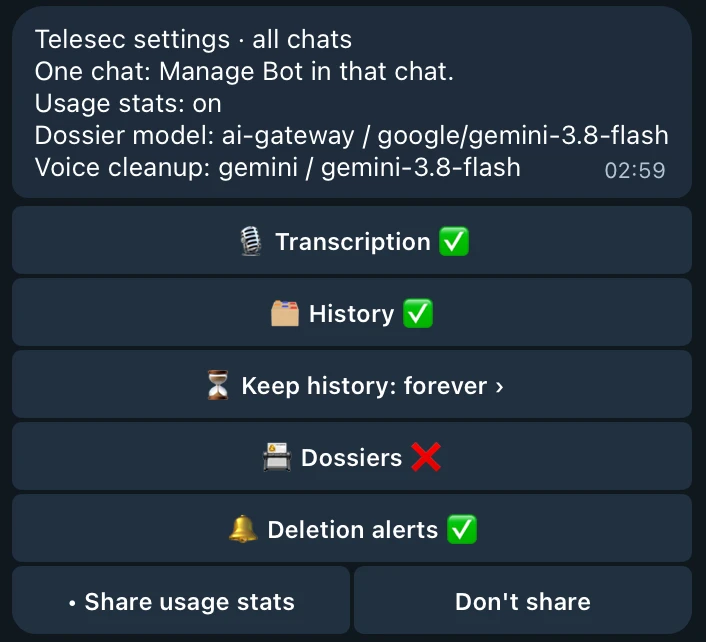
Send /telesec in your private chat with the bot, or tap ⚙️ Settings on any chat’s panel. Each feature is one button: tap ✅ to turn it off, ❌ to turn it on. A change applies to the next message, with no restart. Settings also names the models that build dossiers and clean up transcripts.
- 🎙️ Transcription
- On by default, in every chat.
- 🗂️ History
- Off until you switch it on. Until then, nothing is saved. ⏳ Keep history opens a picker: forever, 1 year, 90 days, or 30 days.
- 📇 Dossiers
- Off by default. Telesec asks first and names the model that will read your chats. While history is off, dossiers pause, and Settings says so.
- 🔔 Deletion alerts
- On by default, with history. When a contact deletes a message that no later message explains, the bot tells you who and in which chat, without the text. 👁 Show text adds it on a tap, and Chat panel opens that chat.
- Usage stats
- Off by default. Share usage stats turns them on, Don’t share turns them off. See what is sent.
- Or from the terminal
- Run
hermes telesec settings set history on. Swap intranscription,dossiers, oralerts, andonoroff, or setretention 90.
Your private chat with the bot
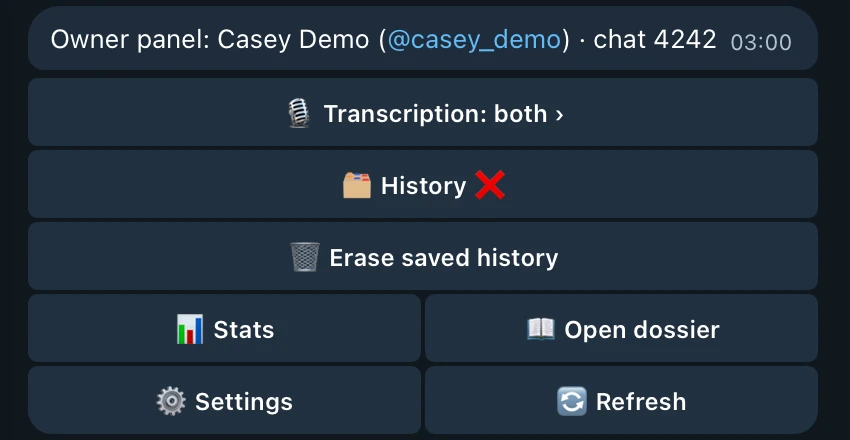
Owner panel
Every chat’s settings,
one tap away.
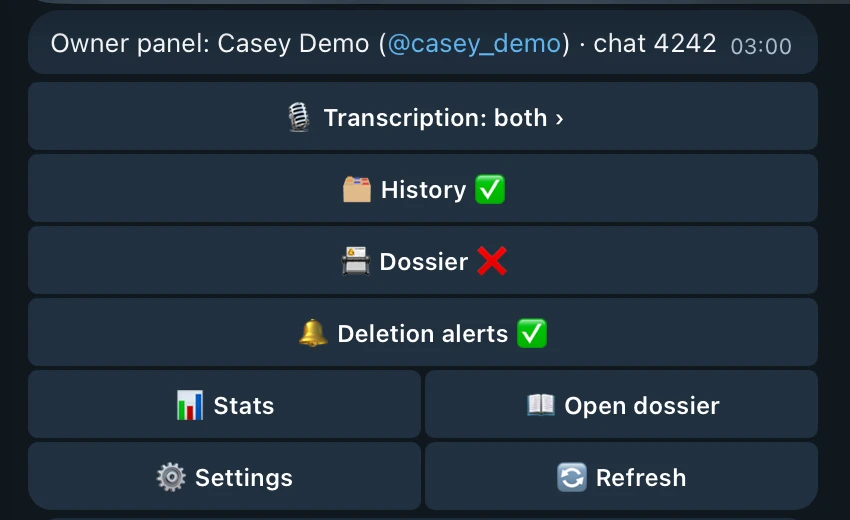
In a Business chat, tap Telegram’s Manage Bot button. Your private chat with the bot opens a panel for that chat. The contact sees nothing.
- 🎙️ Transcription
- Opens a picker in the same message: both sides, only yours, only theirs, or off, and Reset to default. The change applies to this chat at once.
- History, dossier, and alerts, chat by chat
- 🗂️ History, 📇 Dossier, and 🔔 Deletion alerts each switch with one tap for this chat. Off is not delete: what is already saved stays.
hermes telesec chat setdoes the same. - 🗑 Erase saved history
- Shows once a chat saves nothing. It asks first, then deletes this chat’s saved history and its dossier. From the terminal:
hermes telesec history forget --chat 2000. - 📊 Stats
- This contact’s stats report for 7, 30, or 90 days, or all time.
- 📖 Open dossier
- This contact’s dossier and your note, with Refresh and your persona.
Your private chat with the bot
Get started
Add it to Hermes Agent.
Install in the same profile that runs your Telegram gateway.
Install the plugin
hermes plugins install neoromantic/telesec --enablehermes gateway restart Copy to clipboardChoose what to switch on
Transcription is on from the start. Send
/telesecto your bot and tap 🗂️ History to keep your Business text; deletion alerts start with it. Then tap 📇 Dossiers to build dossiers from it; this sends private chat text to the model that Settings names. Or run:hermes telesec settings set history onhermes telesec settings set dossiers onCopy to clipboardNo restart needed.
Find your first conversation
Tap Manage Bot in a Business chat to open its panel, or search from the command line:
hermes telesec history contacts --search mayahermes telesec history show --contact @mayachen --since 7dCopy to clipboard
Privacy & data
Your host.
Your choices.
Usage stats, off by default. Nothing is sent until you turn them on: Share usage stats in Settings, Enable usage stats under the one-time notice in your chat with the bot, or hermes telesec telemetry on. Seeing the notice turns nothing on, and neither does TELESEC_TELEMETRY=1. Once on, the plugin sends its author which features run, error types, the version, and the OS, with a random install ID. Never message text, transcripts, names, or IDs. Turn them off with Don’t share in Settings, hermes telesec telemetry off, TELESEC_TELEMETRY=0, or DO_NOT_TRACK=1. What is sent and the public numbers: sergeybaus.com/usage.
Your data stays on your host. Settings, modes, history, and dossiers stay in your Hermes profile.
Business chats stay out of the agent. By default, Business messages, yours or a contact’s, are never passed to the Hermes agent. In a group you list, the agent gets a recording only when it is a spoken request. Group messages never reach history, stats, or dossiers.
Audio goes to the speech provider configured in Hermes, which may run locally or externally. Optional cleanup sends the transcript to your configured model. Audio downloads are deleted after processing.
History is off until you switch it on in Settings and starts with new messages, or with a chat export you import. It deliberately keeps earlier edits and deleted text: deleting in Telegram does not erase it, and neither does turning 🗂️ History off in a chat’s panel. Erase saved history in that panel, or hermes telesec history forget, deletes one chat’s history and dossier. Choose how long to keep it in Settings, and handle backups as part of your own removal process. Deletion alerts go only to your chat with the bot and show the deleted text only when you tap 👁 Show text.
Dossiers are off until you switch them on in Settings, which names the model first. Only then does private chat text go to that model; history capture alone never does. By default it is Gemini 3.8 Flash through Vercel AI Gateway with zero data retention. A contact gets their dossier or a stats card only when you send /dossier or /stats in their chat. Your note’s text, your persona, and message refs are never posted, though a fact from your note can be in the dossier text. The dossier goes out only after it has seen every deletion and edit Telesec recorded. It is written for you, and the contact reads it as it is.
This website uses cookieless PostHog analytics for page visits, link clicks and the steps a browser’s AI agent takes on its controls: the kind of control, the action and whether it was allowed, and whether the browser offers the page to its agent at all. Session recording is disabled. Website analytics are separate from the plugin and never receive your Telegram conversations.
A few practical details
Before you connect.
You need Hermes Agent: this is a plugin for a running Hermes Agent gateway, with a Telegram bot connected to your Telegram Business account. Group transcription works without Business, in groups you list for the bot. It is a separate community integration, not an official Telegram or Nous Research product.
Voice messages, round video notes, and recognized audio attachments, yours and every contact’s. Attached files are checked for size, duration, and speech before full transcription. The defaults are 5 minutes and 20 MB. Generic documents and ordinary videos pass through.
Yes, one private chat at a time, from a Telegram Desktop export in JSON: hermes telesec history import result.json --chat 2000. Stats, search, and new dossiers then see the earlier text. Without an import, history starts with new Business text after you switch it on. It records text, edits, deletions, reply relationships, available contact details, and the voice transcripts Telesec posts. Media and other captions are excluded in this version. Read how to import past messages.
No. Telesec transcribes supported media, optionally records text history, and can build opt-in contact dossiers. In a Business chat it posts only transcripts and, when you send /dossier or /stats, the contact’s dossier or a stats card. By default no Business message starts a Hermes agent turn. Suggested replies and automatic replies are planned.
The plugin is free and MIT licensed. Your Hermes host, Telegram Business account, speech provider, and optional cleanup and dossier models have their own requirements and any applicable costs. The plugin has no separate subscription.
No. Preserving earlier text is what makes deletion inspection possible. History is kept forever unless you pick 1 year, 90 days, or 30 days in Settings. Then whole months older than that are removed; the current month and pending deletion evidence stay. To erase one chat, set it to 🗂️ History off and tap 🗑 Erase saved history in its panel, or run hermes telesec history forget. Single messages cannot be erased. Read the retention and removal instructions.
Your conversations,
within reach.
Read voice notes as text. Keep messages, even deleted ones.